 Joyrise
YouTube SEO Tags Generator: Definitive Guide for 2026
 By Alexi · · 12 min read

On this page
- Executive Summary
- What YouTube Tags Are and Why They Still Matter in 2026
- How a YouTube SEO Tags Generator Works
- Choosing a Tag Generator: Options and Tradeoffs
- 5 Steps to Use Tags Strategically in Your Videos
- 2026 Update: Tags and the New YouTube Shopping Recommendations
- Common Mistakes and Persistent Myths
- The Future of YouTube Tags and Automation
- Next Steps: Build a Tagging Engine That Scales
- What is a YouTube tag generator?
- Are YouTube tags still worth using?
- How many YouTube tags should you use?
- YouTube tags vs. hashtags vs. categories: what’s the difference?
- Do YouTube tags work for YouTube Shorts?
- Can I see other YouTubers’ tags?
- What’s the YouTube tag character limit?
- How do tags help on YouTube?
- Key Takeaways
A YouTube SEO tags generator is a tool that automatically suggests relevant, keyword‑rich tags for your video—using a seed topic, a competitor’s URL, or even the video transcript itself. In 2026, tags remain a small but signal‑rich piece of YouTube’s discovery algorithm, and using a generator correctly can save hours of manual research. This guide moves beyond “enter a keyword, copy the tags.” You’ll learn how to build a repeatable tagging system that adapts to YouTube’s AI, integrates with automated content pipelines, and takes advantage of the platform’s new Shopping recommendations for affiliate creators.
Executive Summary
Tags are not dead. They’re just under‑leveraged. Most creators still treat a YouTube SEO tags generator as a one‑and‑done lookup tool—paste a video link, grab a list, never look back. That misses the real opportunity: using tag generators as part of a data‑driven, iterative system that evolves with your channel’s analytics and YouTube’s expanding feature set. This guide covers the mechanics of tag generation, a practical framework for using tags across Shorts and live streams, a comparison of leading generators and their tradeoffs, and a deep look at how the November 2026 Shopping recommendations reshape affiliate tagging. By the end, you’ll have a blueprint for a tagging engine that scales—without adding hours to your publishing workflow.
What YouTube Tags Are and Why They Still Matter in 2026
Definition and YouTube’s Official Stance
Tags are free‑form text keywords you add in YouTube Studio when uploading a video. YouTube’s official documentation states that tags “can be useful if the content of your video is commonly misspelled” and that they “help YouTube understand the content and context of your video.” That’s the platform’s understated position, but practical experience and third‑party analysis confirm tags contribute to search relevance, especially for long‑tail queries and content where the title and description alone might be ambiguous.
How Tags Influence Search and Discovery
YouTube’s recommendation system uses tags as one of many signals to determine topical relevance. They matter most when a video covers a niche subject or when the spoken language differs from the video’s dominant language. Tags also help YouTube connect your video to related content, which influences Suggested Video placement. The impact is not huge—title, description, thumbnail, and viewer behavior carry far more weight—but in competitive categories, well‑chosen tags can be the tiebreaker that lands a click.
Debunking the ‘Tags Are Dead’ Myth
Every few years, a YouTube experiment or misquoted statement revives the myth. In 2026, tags are alive and routinely used by top creators. The confusion stems from YouTube’s own statement that tags play a “minimal” role in discovery—which they do, relative to watch time and viewer satisfaction. But minimal does not mean zero. When you’re fighting for rank on a specific long‑tail search, relevant YouTube SEO tags still provide a measurable edge.
How a YouTube SEO Tags Generator Works
The Technology Behind Tag Generators
Most generators fall into two categories: keyword‑expansion tools and content‑scraping tools. Keyword‑expansion generators take a seed phrase (e.g., “budget home office setup”) and use large language models or keyword databases to produce related terms—often pulling from Google Trends, YouTube auto‑suggest, and competitor tag data. Content‑scraping generators, like the free YouTube tag tool from Exemplary AI, analyze the video’s own transcript or title to extract entities and concepts, then map them to potential tags.
The better tools combine both approaches. A best YouTube tag generator in 2026 will layer search volume estimates, trending tags in your niche, and even product data if you’re in the affiliate program.
Free vs. Paid Generators: What You Actually Get
A free YouTube tag generator typically gives you 10 to 20 tags for a single video. It may include a Chrome extension to grab tags from competitor videos. That’s sufficient for a casual upload. Paid tools—like TubePilot or the premium tiers of Flowshorts—offer bulk generation, keyword research integration, tag performance tracking, and sometimes API access for automation. The real differentiator is not the number of tags but how well the tool learns from your channel’s analytics over time. A free generator treats every video like a blank slate; a paid, channel‑aware system can prioritize tags that have historically driven impressions for your content.
Accuracy and Limitations: What No Generator Can Do
No generator can guarantee ranking. They work from probabilistic models, not inside access to YouTube’s ranking algorithm. Common failure modes include:
- Over‑relying on search volume without context, producing tags that are popular but irrelevant.
- Generating tags that are too generic (“2026,” “vlog,” “review”) that add zero differentiation.
- Missing the specific intent behind a video, especially tutorials or how‑to content where the question being answered isn’t obvious from a seed keyword.
Every list still needs a human pass. The generator is a research accelerator, not a replacement for editorial judgment.
Choosing a Tag Generator: Options and Tradeoffs
Feature Comparison: Popular Tools in 2026
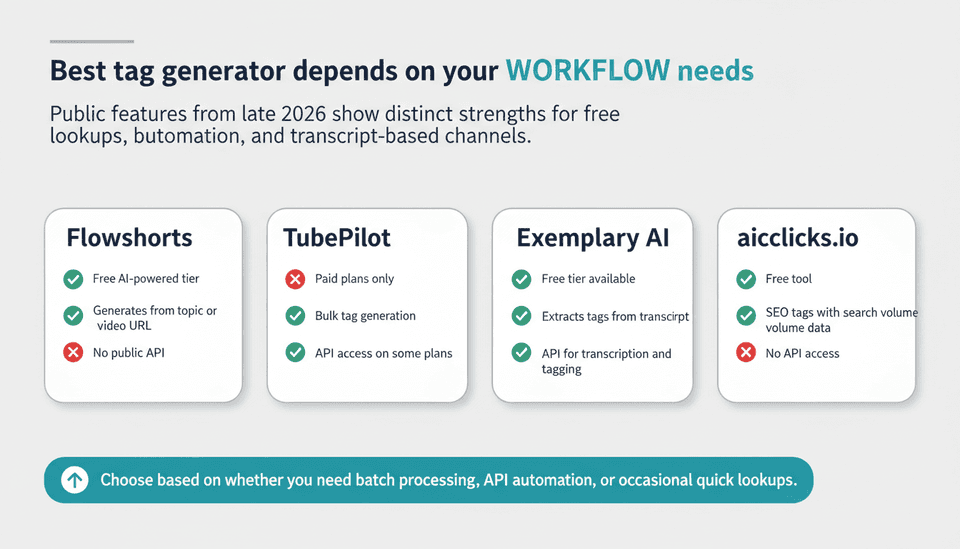
The landscape has consolidated around a few models. The table below summarizes key differences based on publicly documented features as of late 2026.
| Tool | Free Tier | Key Differentiator | API / Integration | Accuracy Note |
|---|---|---|---|---|
| Flowshorts | Yes, AI‑powered | Generates from topic or video URL; includes trending tags | No public API | Broad suggestions; may include irrelevant tags |
| TubePilot | Paid plans | Bulk tag generation, keyword research built‑in | API available for some plans | Higher relevance, but still needs manual review |
| Exemplary AI | Free tier | Extracts tags directly from video transcript | API for transcription & tagging | Excellent for spoken‑content channels |
| aiclicks.io | Free | SEO‑focused tags with search volume data | No | Good for quick keyword research integration |
The best YouTube tag generator for your workflow will depend on whether you need batch processing, API access for automation, or just a quick lookup for occasional uploads.
Integration with Your Video Production Workflow
Tag generation shouldn’t be a separate chore. If you already use a tool to generate your title and description—like a YouTube SEO title generator or description generator—then a tag generator can be part of the same pre‑upload checklist. The real efficiency gain comes when you connect the generator to your content calendar: pull the target keyword from your SEO planning sheet, auto‑generate a tag set, and have it populate YouTube Studio via API or bulk upload. This is the zone where paid tools with API access justify their cost for channels publishing 20+ videos a month.
The Missing Piece: Tags in an Automated Content Strategy
If you run a content operation that publishes daily SEO articles, you already have a keyword research engine. Inject that same source into your video tagging process. For example, a team using an automated content marketing platform like Joyrise to handle blog publishing can extend that automation to YouTube by feeding the same keyword clusters into a YouTube SEO tags generator. Instead of siloed blog keywords and video tags, you get cross‑channel consistency that reinforces topical authority. This matters because Google often surfaces YouTube results in search, and shared keyword signals between your blog and video content can improve overall visibility.
5 Steps to Use Tags Strategically in Your Videos
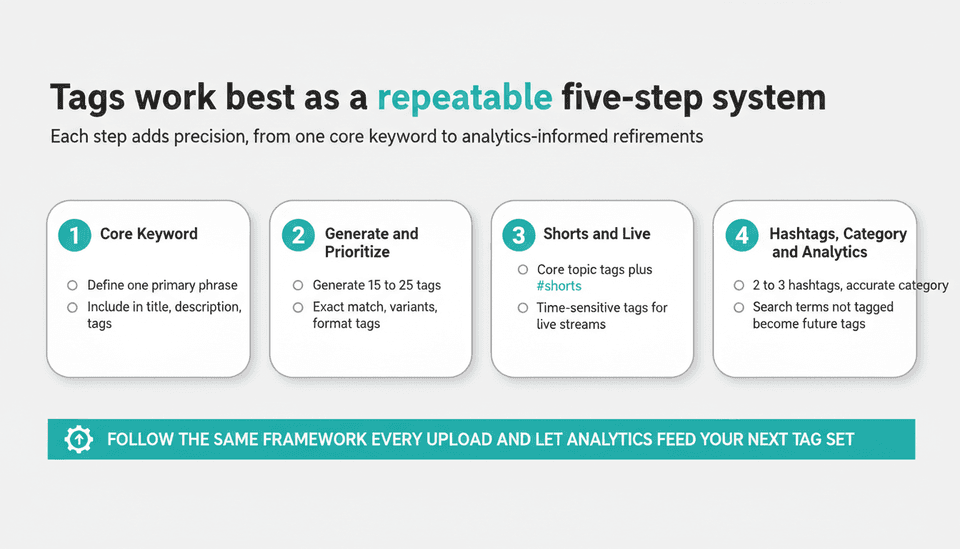
Start with a Core Keyword (Not Just Tags)
Before you touch a generator, define one primary keyword phrase that your video is targeting. This should appear in your title, description, and tags. A YouTube keyword generator can help you validate search volume and competition for that term. Without a clear core keyword, your tag strategy becomes aimless keyword stuffing.
Generate and Prioritize Tags
Use your chosen YouTube tag tool to generate an initial list of 15 to 25 tags. Rank them manually by relevance and specificity. Keep tags that directly describe the video’s topic, include the core keyword exactly as typed, and cover common synonyms. Discard anything that feels like a keyword grab (“2026 trends,” “new,” “best” unless genuinely descriptive). The goal is a set of tags that precisely defines the video for both humans and algorithms.
A simple prioritization framework:
- Exact‑match core keyword.
- Two to three close variants (plural, long‑tail).
- Broad category tags (e.g., “productivity tools”).
- Format tags if applicable (“shorts,” “livestream,” “tutorial”).
- Location or language tags if targeting a specific audience.
Optimize for YouTube Shorts and Live Streams
Shorts and live streams are not afterthoughts. YouTube’s recommendation system can surface Shorts based on tags just as it does for long‑form. When tagging a Short, include the core topic tags and add “#shorts” as a hashtag in the description, but also include a plain‑text tag like “instagram vs reality” if that’s the joke. For live streams, use time‑sensitive tags such as “live Q&A” or “daily news November 2026.” SEO for YouTube Shorts works best when your tag strategy accounts for the shorter shelf‑life and different discovery patterns of vertical content.
Combine Tags with Hashtags and Categories
Tags, hashtags, and categories serve different functions. Hashtags appear above your video title and are clickable; they’re a user‑facing discovery tool. Tags are backend metadata. Categories provide a high‑level bucket (e.g., “Education”) that influences YouTube’s broad categorization. For maximum coverage, place 2–3 relevant hashtags in your description and select the most accurate category, then let your tags handle the granular topic signals. The combination gives YouTube multiple layers of context.
Monitor and Refine with YouTube Analytics
Set‑and‑forget tagging is a missed opportunity. In YouTube Analytics, navigate to the “Traffic source: YouTube search” report. Look for search terms driving impressions and clicks that aren’t among your tags—those are tag candidates for future videos. Conversely, if certain tags never appear in search queries, they’re likely not pulling weight. Over a few upload cycles, you’ll build a channel‑specific tag bank that outperforms any generic generator output.
2026 Update: Tags and the New YouTube Shopping Recommendations
What the Shopping Recommendation Feature Means for Tag Strategy
On November 6, 2026, YouTube’s Creator Insider channel detailed a personalized Shopping recommendations shelf in YouTube Studio, reported by NeoTeo on November 10, 2026. The shelf suggests products to eligible affiliate creators based on channel content, audience engagement, and niche trends. This changes the tagging game: you can now tag products in your videos, Shorts, and live streams, and those product tags feed into recommendation signals.
If you’re an affiliate creator, your YouTube SEO tags generator strategy must now incorporate product‑specific keywords alongside topic tags. For example, a tech reviewer uploading a “best budget laptop 2026” video should generate tags for the specific laptop models mentioned, not just generic “budget laptop” tags. When you tag a product that YouTube’s system recognizes from its affiliate catalog, you increase the chance that your video appears in the personalized Shopping shelf for viewers with relevant purchase intent.
Tagging Products for Affiliate Success
The existing affiliate program supports product tags in videos, Shorts, and live streams. The new recommendation shelf amplifies that: if you consistently tag the products you feature, YouTube is more likely to surface them to viewers whose behavior suggests buying interest. Your tag workflow should now include an explicit step: “Add product tags for every featured item, using the exact product name as it appears in the affiliate catalog.” This pairs with your regular SEO tags—product tags aren’t a replacement, they’re a parallel layer that drives commerce‑oriented discovery.
Common Mistakes and Persistent Myths
Overstuffing or Irrelevant Tags
Stuffing 40 tags into a 3‑minute cat video is counterproductive. YouTube’s systems interpret this as spam and may ignore your entire tag block. Focus your tags on the specific topic, and don’t add unrelated trending terms just for reach.
Ignoring Title and Description for Tags
Tags work in concert with your title and description, not in isolation. If your title says “How to Sharpen a Knife” but your tags are all about “kitchen gadgets,” the mismatch confuses the algorithm. Always align your core keyword across all three metadata fields.
Believing Tags Alone Drive Rankings
No amount of perfect tagging will compensate for a video with poor retention or low click‑through rate. Tags are a supporting signal, not a primary ranking factor. Spend your time first on creating content that people want to watch; then optimize the metadata.
The Future of YouTube Tags and Automation
YouTube tags generators will increasingly become API‑first utilities integrated into end‑to‑end video SEO platforms. Expect generators that pull real‑time search data from YouTube’s suggestion API, auto‑adjust tags based on the first 48 hours of performance, and synchronize with your video’s product tags and Shopping‑eligible items. For channels and publishing teams that treat content as a repeatable operation, auto generate YouTube tags as part of a larger AI SEO content optimization pipeline is the logical next step—reducing manual work without sacrificing precision.
Next Steps: Build a Tagging Engine That Scales
A one‑off tag generator lookup is only step zero. To actually scale, you need a system that:
- Starts every video with a validated core keyword from your content calendar.
- Runs that keyword through a reliable generator, preferably one with API access.
- Applies a consistent prioritization framework (exact match → variants → broad → format).
- Automatically populates YouTube Studio metadata or your bulk upload sheet.
- Closes the loop by pulling YouTube Analytics data back into your keyword planner to refine the next video’s tags.
If you’re already publishing written SEO content at scale via a platform like Joyrise, feed the same keyword research into your video workflow to maintain topical consistency across blog and YouTube. That cross‑channel alignment is one of the most underused tactics in 2026, yet it directly benefits from YouTube’s increasing integration with Google Search.
What is a YouTube tag generator?
It’s a tool—usually web‑based—that suggests relevant tags for your video based on a seed keyword, a video URL, or the video’s transcript. Free YouTube tag generators produce a handful of suggestions; paid versions add volume, search data, and automation hooks.
Are YouTube tags still worth using?
Yes. While their direct impact on ranking is moderate, they remain a useful signal for niche content, misspellings, and context disambiguation. Skipping tags in a competitive category means leaving a small but real discovery channel untapped.
How many YouTube tags should you use?
There’s no magic number, but 15 to 25 tags per video is a practical sweet spot that balances specificity with breadth. Stay under the hard limit of 500 characters, including commas. Every tag you add should earn its place by directly describing the video.
YouTube tags vs. hashtags vs. categories: what’s the difference?
- Tags are backend metadata that helps YouTube classify and recommend your video. Viewers rarely see them.
- Hashtags appear above your video title (and in the description) and are clickable discovery tools for viewers.
- Categories are broad groupings like “Music” or “Science & Technology” that you select during upload.
Use all three together: categories for broad placement, tags for topic precision, hashtags for user‑facing discoverability.
Do YouTube tags work for YouTube Shorts?
Yes. Shorts are treated as videos by YouTube’s metadata system. Tags help the algorithm understand the Short’s content, just as they do for long‑form. Adding the #shorts hashtag is also recommended.
Can I see other YouTubers’ tags?
You cannot natively view private tags through YouTube Studio, but several third‑party YouTube tag tools, including browser extensions like the YouTube Tags Chrome extension, can extract the tags that a video’s creator has chosen to make visible. Note: some creators hide tags entirely, and not all extensions remain up‑to‑date with YouTube’s front‑end changes.
What’s the YouTube tag character limit?
The total character count for all tags combined must not exceed 500 characters, including commas. YouTube will prevent you from saving tags that exceed this limit.
How do tags help on YouTube?
Tags help YouTube understand your video’s subject matter so it can surface your content in relevant search results and suggestions. They also contribute to grouping your video with related content, which can improve discovery when viewers watch similar videos.
Key Takeaways
- A YouTube SEO tags generator saves time, but its real value comes when you treat it as part of a repeatable, analytics‑informed system, not a one‑time lookup.
- Free generators work for occasional uploads; paid tools with API access and channel learning are essential if you publish at scale and need cross‑format consistency.
- YouTube’s November 2026 Shopping recommendations make product‑specific tags a new must‑have for affiliate creators, directly influencing placement in the personalized Shopping shelf.
- Shorts and live streams need the same deliberate tagging approach as long‑form video—tailor tags to the format and discovery window.
- Tags alone won’t make a video go viral; align them with a strong core keyword, a compelling title, and content people actually want to watch.
Build a system that feeds tag data back into your next video’s planning, and your library gets stronger with every upload—sign up for Joyrise to power the content engine behind that system.