 Joyrise
YouTube SEO Description Generator: A Complete Guide
 By Alexi · · 13 min read

On this page
- Executive Summary
- What can I use a YouTube description generator for?
- 1. What a YouTube Description Actually Does for SEO
- 2. Inside a YouTube SEO Description Generator: How AI Writes Copy for Rankings
- 3. Feature Spectrum: Free Tools vs. Paid vs. Purpose‑Built Workflows
- 4. The Description Generator Workflow: From Raw Transcript to Published Copy
- 5. The Hidden Limitations of AI‑Generated Descriptions (and 5 Ways to Fix Them)
- 6. Measuring Description Performance Beyond Clicks: Signals That Actually Matter
- 7. A Decision Framework: Generator, Manual, or Hybrid?
- 8. Common Myths That Kill Your Description’s Reach
- 9. Where YouTube SEO Generators Fit into a Broader Content Strategy
- 10. Final Takeaways and Next Steps
- Key Takeaways
Executive Summary
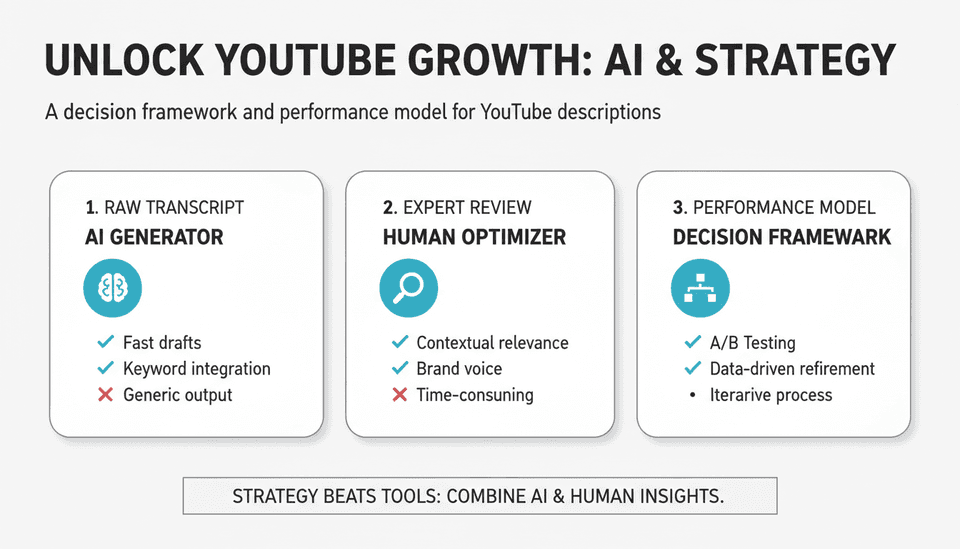
A YouTube SEO description generator can turn a raw transcript into a ranked description, but most guides stop at tools. This guide gives you a decision framework and performance model.
What can I use a YouTube description generator for?
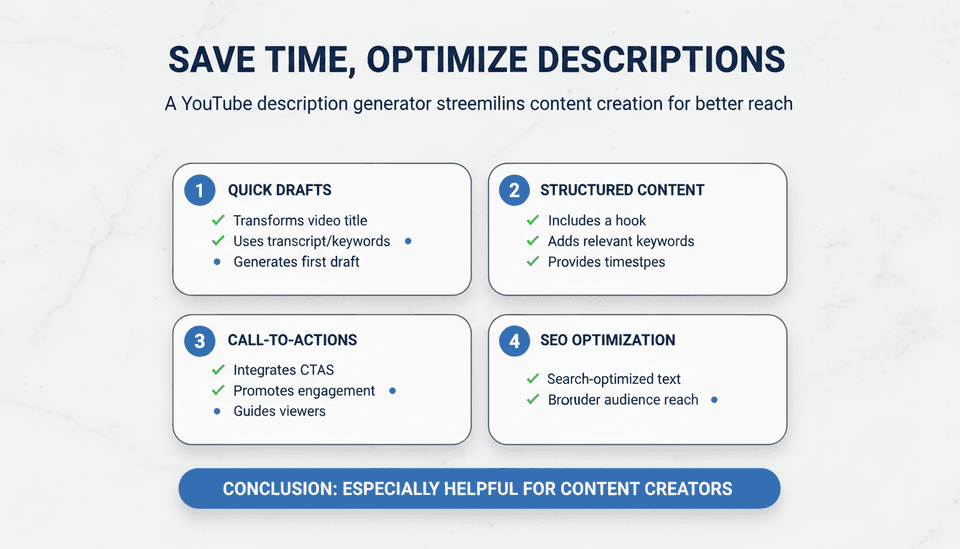
A YouTube description generator saves time by transforming a video title, transcript, or keywords into a structured, search‑optimized description. You can use it to quickly generate a first draft that includes a hook, relevant keywords, timestamps, and CTAs. It’s especially helpful for scaling video output when manual writing becomes a bottleneck, but the best results come from combining the generator’s output with human editing to ensure brand voice and accuracy.
1. What a YouTube Description Actually Does for SEO
What is a YouTube video description?
The description is the text block that appears below your video. It serves three audiences at once: viewers scanning for timestamps and links, YouTube’s ranking system that reads relevance, and Google search, which often surfaces YouTube results with the description as the snippet. A description can be up to 5,000 characters, but YouTube only shows the first two or three lines before the “Show more” cut. What you put there — and how you structure the rest — directly influences whether someone clicks and whether the platform understands your video enough to recommend it. Before automating, it’s essential to understand how to write a YouTube description for SEO.
Beyond the obvious keyword placement, a YouTube SEO description functions as a structured data signal. YouTube Help confirms that accurate, keyword‑rich descriptions help the algorithm surface videos for relevant queries (source: Tips for video descriptions - YouTube Help). It is not a ranking factor in isolation; it works together with the title, thumbnail, captions, viewer behavior, and channel authority.
2. Inside a YouTube SEO Description Generator: How AI Writes Copy for Rankings
What is a YouTube video description generator?
A YouTube video description generator is an AI‑powered tool — standalone or built into a larger platform — that creates a complete video description from a minimal input. Most tools ask for one or more of the following: a video title, a target keyword, a short summary, a transcript snippet, or the full spoken transcript. The output is a formatted description with an attention‑grabbing first two lines, a summary paragraph, optional timestamps, links, and a call‑to‑action. The goal is to save time while still hitting YouTube SEO best practices. Many creators now generate YouTube descriptions with AI, but you must still apply YouTube video description best practices to avoid generic patterns.
How does a YouTube description generator work?
Under the hood, these tools rely on a large language model (LLM) fine‑tuned or prompted for YouTube’s specific constraints. When you give it a topic like “how to replace a toilet fill valve,” the model:
- Extracts the primary keyword and places it near the start.
- Generates a hook line — often using a question or a benefit statement — to grab attention above the fold.
- Writes a short, search‑friendly summary that includes secondary keywords and natural variations.
- Adds a timestamp section if a transcript or outline is available.
- Appends links and a call‑to‑action using templates you can customize.
Some generators go further: they read the video’s auto‑captions, identify sections, and build a description that mirrors the video’s real structure. Others simply stitch canned phrases like “In this video, we’ll cover…” and replace placeholders. The quality gap is enormous, and it leads directly to the tool choices in the next section.
3. Feature Spectrum: Free Tools vs. Paid vs. Purpose‑Built Workflows
YouTube description generator tools cover a broad spectrum, from one‑click free versions to full content platforms. Understanding the ceiling of each helps you choose the right one for your volume and outcomes.
YouTube description generator tools comparison
| Tool type | Input needed | Output quality | SEO scoring | Brand voice control | Integration with publishing | Best for |
|---|---|---|---|---|---|---|
| Free YouTube description generators | Title + keyword | Templated, often generic | None | Minimal | Manual copy‑paste | Low‑volume casual creators |
| Paid AI‑writers with SEO modules | Title, transcript, target keywords | Higher structure, some include keyword density scoring | Basic keyword checker | Custom voice profiles possible | Often via API or direct integration | Mid‑volume channels with consistent branding |
| Full content platforms (e.g., YouTube SEO suites) | Full transcript or auto‑captions, channel data | Descriptions that reflect video chapters, sentiment, and related content | Advanced (competitor gap, trend detection) | Extensive, learns from past descriptions | Direct publish to YouTube, connected to scheduling tools | High‑volume teams, brand channels, agencies |
Free generators and their ceilings
Free YouTube description generator tools, like the ones provided by TubeTranscript or Canva, are useful for getting a quick, structured starting point. They rely on a pre‑defined YouTube description template and fill in blanks (source: YouTube Description Generator - TubeTranscript). However, they rarely understand nuance — a video about a software tutorial and a makeup review will get the same sentence skeleton. If you upload three videos a month and treat the description as a rough draft, free generators work. If you need scale or discovery growth, free tools produce a generic flavor that trained viewers begin to ignore.
Paid AI-writers with SEO modules
Paid tools such as TubeRanker or dedicated AI YouTube description generator services within broader SEO suites deliver more adaptive output. They can ingest a full transcript or use your existing YouTube SEO 2026 strategy keyword lists to tailor the copy, and some grade the description’s estimated on‑page strength. The trade‑off is cost and the need for a review step — no paid tool is 100% hands‑off if you care about accuracy.
When a full content platform rewrites the playbook
For channels that publish daily or operate across multiple languages, purpose‑built YouTube SEO tools with integrated generation, scheduling, and analytics move beyond description writing into orchestration. They can pull in channel‑wide data, seasonality trends, and even connect to external content assets (blog posts, landing pages). The description becomes one node in a wider content graph — which is exactly the terrain where manual effort breaks and a hybrid automation strategy shines.
4. The Description Generator Workflow: From Raw Transcript to Published Copy
A generator is not a “set and forget” button. Embedding it into a reliable workflow is what separates a channel that grows from one that merely publishes. YouTube video description best practices demand a human touch even when using templates. Here is a production‑grade sequence that works for a team of one or a small video team.
- Prepare your input. Export the video transcript from your editing tool or download YouTube’s auto‑captions. Remove obvious transcription errors, formatting artifacts, and filler words. The cleaner the transcript, the more accurate the AI’s understanding of your content.
- Define primary and secondary keywords. Pull these from your research, not from the tool’s guesswork. Use a source like SEO YouTube Keywords: The 2026 Definitive Guide if you need a systematic approach.
- Run the generator. Feed the transcript, title, keywords, and any channel‑specific preferences (custom links, boilerplate “About this channel” paragraph) into the tool. Many paid tools let you set templates that get auto‑applied.
- Review raw output against a short checklist:
- Does the first 150 characters contain the target keyword and a hook?
- Are timestamps accurate and do chapters match the video?
- Are all links correct and working?
- Is the tone consistent with your brand?
- Are there any factual errors introduced by the AI?
- Human edit pass. Even with a strong generator, you will need to rewrite 10‑20% of the text — often the transition phrases that sound forced, or the repeated filler structures. This is where you insert unique angles or call out a specific moment from the video.
- Publish or schedule. If your generator integrates with YouTube or a scheduling tool like TubeBuddy or VidIQ, push the final description directly. Otherwise, copy and paste, then double‑check the live view on mobile and desktop.
How do I integrate a description generator into my production workflow?
Integration means more than pasting output. Build the generator step into your post‑production checklist immediately after transcript approval. If you use a project management tool (Notion, Asana, Trello), create a template task titled “Generate and review description” that auto‑populates with the checklist above. For teams producing 10+ videos per week, batch the generation step: process all transcripts in one sitting, then move to editing. This reduces context‑switching. If your CMS or video hosting platform supports APIs, look for a tool that can push the description automatically once a human marks it as approved — this closes the gap between creation and publish without manual copy‑pasting errors.
5. The Hidden Limitations of AI‑Generated Descriptions (and 5 Ways to Fix Them)
What are the biggest limitations of AI-generated descriptions?
AI YouTube description generator outputs suffer from patterns that are invisible at first but accumulate across a channel. The three most damaging:
- Over‑optimization signals. When a description stuffs the target keyword 8 times in 1,000 characters and includes every related keyword in a list, it reads like a machine wrote it. YouTube’s system has evolved to recognize unnatural density, and viewers may find it alienating.
- Repetitive phrase templates. A common tell is an opening like “In this video, we discuss…” followed by a list and closing with “Don’t forget to like and subscribe.” When every video on a channel uses the same skeleton, subscribers tune out, and new viewers sense a low‑effort channel.
- False precision in timestamps. AI that generates timestamps without actual video chapter data often creates plausible‑sounding sections that do not match reality. A viewer clicking “02:30 – Common mistakes” expecting a specific tip and getting a transition will leave quickly — harming watch time signals.
Five fixes to apply immediately:
- Vary your opening hook. Replace generic intros with a specific question or a strong statement that only fits this video.
- Limit keywords to 2‑3 primary phrases placed naturally — use synonyms in the body, not a keyword list.
- Validate timestamps manually. Never publish AI‑generated chapters without checking them against the real edit.
- Inject one unexpected element. A short personal note, a link to a related blog post (such as how you optimize AI content for SEO), or a relevant statistic breaks the machine pattern.
- Rotate call‑to‑action phrasing. Create 4‑5 approved CTA variations and cycle through them so regular viewers don’t feel they’re reading the same sign‑off.
6. Measuring Description Performance Beyond Clicks: Signals That Actually Matter
How do I measure if my description is working?
YouTube Studio’s traffic source reports give you “YouTube search” clicks and impressions, but that metric alone is misleading. A description’s real job is to improve watch time and session duration from viewers who arrived via search or recommendations, not just to generate an initial click. Isolating its contribution requires a triangulated view.
Here are the signals that matter for a YouTube SEO description:
- Search impressions to watch time ratio. Isolate traffic from YouTube search in Analytics. If impressions and clicks are rising but average view duration is dropping, your description might be setting the wrong expectation. Compare videos with similar topics and thumbnails but differing description quality.
- “Suggested video” traffic jumps after description refresh. When you improve an old video’s description with timestamps, better keywords, and contextual links, watch for an uptick in suggestions 2‑4 weeks later. This indicates the algorithm has re‑evaluated the content’s relevance.
- External Google traffic. Use Google Search Console (connected to your channel) to see which videos get clicks from web search. A sharp, well‑structured description with schema‑friendly formatting often wins the featured snippet. Track impressions and CTR on discovery from Google.
- Link click‑through rate on description cards. If you include a link to a product, article, or playlist, measure how many users actually click. A generator that adds irrelevant links can depress this signal and look spammy.
- Session watch time lift from description‑linked content. When a viewer clicks a linked video or playlist from the description and continues watching, that session watch time lifts the whole channel. Track which description CTA drives deeper viewing.
No single metric gives a verdict. Build a lightweight scorecard: for each video, note the description type (manual, free generator, paid generator), and track 30‑day search impressions, search view duration, and external clicks. Over a quarter, the pattern reveals whether your generator investment is paying off.
7. A Decision Framework: Generator, Manual, or Hybrid?
When should I write a video description manually instead of using a generator?
The decision is not binary. Use this decision matrix based on video type, volume, and team size.
| Video type | Volume per week | Team size | Recommended approach |
|---|---|---|---|
| Evergreen tutorial, long‑form review, pillar content | 1–3 | Solo | Manual with a reusable YouTube description template — you have time to craft precise timestamps and link to related resources. |
| News reactions, daily vlogs, quick tips | 4–7 | 1–2 | Hybrid: use a generator for the first draft, then edit the top 150 characters and CTAs manually. |
| Product demos, service explainers | 2–5 | Small team (2‑5) | Paid AI YouTube description generator with brand voice training — batch input from transcript; still apply human checklist. |
| Sponsored content or high‑stakes partnership videos | Any | Any | Always manual final check, even if a generator writes the base. Inaccuracies can damage brand trust. |
| High‑volume channel (10+ videos/week) | 10+ | Agency or in‑house team | Purpose‑built YouTube SEO tools with integrated generation, scheduling, and analytics. Manual attention shifts to strategic exceptions only. |
The most scalable path for growth‑focused channels is hybrid: AI for the structural heavy lifting, human edit for the nuance and brand voice. Reserve fully manual writing for the videos that define your channel’s authority.
8. Common Myths That Kill Your Description’s Reach
Myths linger because they sound logical. These three waste your effort and can actively hurt performance.
- “YouTube reads the whole description for ranking.” YouTube Help states the description provides context, but the algorithm prioritizes the first few lines and the metadata you provide (title, tags, captions). A 4,000‑character backstory no one reads does not boost you. Focus the top 200 characters and make the rest scannable with timestamps and relevant links.
- “Keywords in the description guarantee top search results.” Viewer signals (CTR, watch time, engagement) outweigh description text. You can optimize the description perfectly, but if the thumbnail fails or the video loses viewers after 30 seconds, no description will save it. Treat the description as one piece of the YouTube SEO 2026 playbook, not a magic wand.
- “One AI‑generated description fits all videos.” Even the same channel needs variety. A tutorial deserves a different structure than a live stream recap. Generating YouTube descriptions with AI works only when you tailor the template to the video format. Using the same AI prompt for every video signals to viewers — and eventually algorithms — that the channel lacks depth.
9. Where YouTube SEO Generators Fit into a Broader Content Strategy
A video description is a small piece of a much larger SEO puzzle. Relying on a generator without connecting it to your channel architecture and off‑YouTube content misses the biggest growth lever.
Align descriptions with playlists and series. When a description links to the next logical video in a series instead of a random related upload, it increases session watch time. Smart generators can ingest your playlist structure and suggest chapter‑style links within the description, turning each video into a node in a learning path.
Connect video descriptions to blog and site content. Many channels leave traffic stranded because they don’t link from the description to an article that expands on the same topic. If you run a Webflow site and publish daily articles, for instance, a platform like Joyrise can automate that blog content, ensuring there is always a fresh, SEO‑optimized article to link from your video description. This cross‑linking strengthens both the video’s authority and the site’s topical relevance. A generator that understands your content graph — blog posts, landing pages, lead magnets — can automatically insert contextual links, turning a passive description into a conversion engine.
Treat the description as a connector, not a silo. When you’re learning how to write a YouTube description for SEO, think beyond the video. Every link in that description should point to an asset that either extends watch time on YouTube or moves the viewer deeper into a funnel you control. Generators that plug into your full content library do this without manual upkeep. For teams that already use automated blog publishing, integrating video description generation with that same ecosystem creates a single clean line from search to conversion — no extra hours required.
10. Final Takeaways and Next Steps
You don’t need to abandon your current process. Start by measuring the real contribution of your descriptions using the watch‑time‑based signals outlined above, and then pick one fix: vary your hooks, tighten your timestamps, or link to a blog post that reinforces the video’s topic. If your volume is growing past what manual writing can sustain, test a paid generator with brand‑voice controls, but keep a human checklist. The generator is not a replacement for strategy — it’s a force multiplier when you have one.
Key Takeaways
- Build a hybrid workflow: use AI to draft descriptions, then manually edit the opening hook, timestamps, and CTAs to avoid generic AI patterns.
- Measure description impact through watch time from search, not just click-through rate, and track Google external traffic for channel-wide visibility.
- Avoid false precision: never publish AI‑generated timestamps or factual claims without a human verification step.
- Link descriptions to a broader content strategy: connect videos to playlists and blog articles to strengthen topical authority and session length.
- Choose the tool tier based on volume and video type: free generators cap quickly; purpose‑built platforms earn their cost only when you need scale and integration.
Ready to automate the written side of your content strategy while you focus on video? Joyrise plans, writes, and publishes daily SEO articles to your Webflow blog, so your video descriptions always have somewhere relevant to link.