 Joyrise
SEO YouTube Keywords: The 2026 Definitive Guide
 By Alexi · · 20 min read

On this page
- What Are SEO YouTube Keywords? (And Why They Matter in 2026)
- Core Concepts: How YouTube Search Differs from Google
- YouTube Keyword Research: Tools, Data, and Tactics
- Optimizing Videos with Keywords: A Step-by-Step Framework
- The 2026 Shift: Keywords for Product Promotion and Sales
- Scaling YouTube Keyword Strategy with AI and Automation
- Common Mistakes, Myths, and What to Avoid
- Measuring Success: KPIs Beyond Views
- Next Steps: Building a Future-Proof YouTube Keyword Strategy
- Key Takeaways
If you run a YouTube channel for a business, you already know that view counts don’t pay invoices. In 2026, SEO YouTube keywords are less about tricking the algorithm and more about connecting your video content to real money—product sales, affiliate commissions, brand deals, or your own merchandise. This guide is not another free-tool roundup. It gives you a practical, no-fluff framework to research, optimize, and scale YouTube keywords as a strategic lever for revenue, using AI and automation without sacrificing quality.
Executive Summary: YouTube keyword research in 2026 must move beyond basic metadata optimization to drive product conversions and integrate with your broader website SEO. This guide covers keyword types, research methods, AI-driven scaling, and business-aligned KPIs—so you can stop chasing empty views and start building a video search engine that pays.
What Are SEO YouTube Keywords? (And Why They Matter in 2026)
SEO YouTube keywords are the words and phrases people type into YouTube’s search bar—or speak to voice assistants and AI search features—to find videos. They are the bridge between what your audience wants and the content you produce. When you deliberately use those terms in titles, descriptions, tags, captions, and channel settings, you signal to YouTube’s system that your video matches a specific query.
Why do they matter more in 2026 than ever? YouTube is now a full-funnel search and social commerce engine. It is no longer just a repository of videos; it’s a place where product discovery, reviews, unboxings, and direct purchases happen. Search Engine Land, on November 13, 2026, published a comprehensive guide to selling on YouTube that explicitly advocates a conversion-focused keyword strategy—tying video topics directly to product listings, brand sponsorships, and merch. If your keywords don’t account for viewer intent to buy, you’re leaving revenue on the table.
Simultaneously, the sheer volume of AI-generated content on every platform means that precision targeting is the only way to get noticed. The era of keyword-stuffed descriptions is long over; YouTube’s language models now reward relevance, semantic clarity, and user satisfaction. Keywords still matter enormously, but the way you deploy them has evolved—from a game of volume to a discipline of intent.
Do keywords matter on YouTube?
Yes, but not in isolation. Keywords influence whether your video appears in search results, YouTube’s suggested sidebar, and Google’s video carousels. Boston University’s best-practices guide for YouTube SEO notes that the platform’s ranking algorithm relies on metadata keywords to establish relevance, alongside powerful engagement signals such as watch time, click-through rate (CTR), and viewer satisfaction. A perfectly keyword-optimized video with a low CTR will eventually stop ranking. Keywords are a necessary condition, not a silver bullet; they pigeonhole your content for discovery, but viewer behavior determines how far the algorithm spreads it.
In 2026, with AI-curated recommendations and the growing influence of large language models, keyword relevance is even more critical. Accurate keyword usage helps YouTube’s models understand your video’s topic context for personalized feeds and cross-platform suggestions, making it a foundation you cannot skip. A comprehensive YouTube SEO strategy now demands that you align keyword selection with commercial goals, ensuring every piece of metadata works toward a sale, not just a view.
Core Concepts: How YouTube Search Differs from Google
Applying website SEO logic directly to YouTube is a fast way to waste effort. The two search engines operate under different ranking philosophies and data sources—understanding the gaps keeps you from chasing the wrong signals.
The YouTube Algorithm & Keyword Signals
Google’s web search builds its index from text content, links, and structured data; YouTube’s algorithm indexes the video itself—its auto-generated transcript, on-screen text, and spoken words—plus the metadata you provide. The algorithm’s primary objective is to maximize total watch time per session, so it pairs keyword relevance with engagement metrics relentlessly.
Key ranking signals tied to keywords include:
- Video title: the single most heavily weighted field; YouTube recommends putting the primary keyword early without sacrificing click-worthiness.
- Description: the first 200 characters carry disproportionate weight for search and suggested video associations; write naturally, not with a block of comma-separated terms.
- Tags: their direct ranking power has diminished, but tags still help with common misspellings, ambiguous phrases, and contextual clarity.
- Channel keywords: a set of terms in your channel settings that act as a broad, persistent topic signal for everything you publish.
- Hashtags (placed in the description and shown above the title on mobile): useful for Shorts discovery and niche topic grouping.
- Spoken words via captions: YouTube’s AI transcribes your audio and indexes it; keywords you say in the video—especially early on—can influence ranking.
- Timestamps/chapters: keyword-rich chapter titles can appear as “key moments” in Google and YouTube results, giving you additional SERP real estate.
Unlike Google, backlinks have essentially zero direct ranking influence on YouTube. External embeds and referral traffic can boost views and watch time, indirectly lifting rankings, but there’s no PageRank equivalent for video.
Types of YouTube Keywords: Short-Tail, Long-Tail, and Intent-Based
A practical way to organize your research:
- Short-tail keywords (1–2 words): high volume, nearly impossible for new or mid-sized channels to rank for. Example: “iPhone review.”
- Long-tail keywords (3+ words): lower volume per term but far less competition and clearer viewer intent. Example: “iPhone 17 Pro battery life test vs Samsung S26.” These are the realistic battleground for most channels.
- Intent-based keywords, clustered by what the viewer wants to do:
- Informational: “how to start a podcast”
- Commercial investigation: “best microphone for podcasting under $200”
- Transactional: “buy Shure SM7B unboxing setup”
- Navigational: branded or channel-specific, like “MKBHD iPhone review”
The big shift in 2026 is that commercial and transactional intent keywords represent the highest underutilized ROI; they attract viewers with a purchase mindset, yet most creators still chase informational traffic that rarely converts.
YouTube Keyword Research: Tools, Data, and Tactics
What is a YouTube Keyword Research Tool?
A YouTube keyword research tool is any software that helps you discover terms people search on YouTube, estimate their popularity or competition, and structure them into content plans. Unlike Google Ads Keyword Planner, no official YouTube search volume API exists, so these tools combine data from YouTube’s suggest feature, autocomplete, scraped rankings, and sometimes clickstream sources to build their databases.
The essentials that a useful tool should provide:
- Keyword suggestions triggered by a seed word
- A relative search-volume indicator (often a “high/medium/low” score or a proprietary number, since absolute counts are not public)
- Competition metrics—such as average views, subscriber counts, and engagement on top-ranking videos—so you can gauge difficulty
- Trend charts to spot seasonal patterns
Free vs. Paid Tools: What’s Actually Worth Your Time
Free YouTube keyword tools—like the ones at vidIQ or TubePilot—can surface quick ideas and give you a rough competitiveness score. For a beginner validating whether a topic has any audience at all, they are adequate. But if YouTube is a revenue channel for your business, free tools quickly become a bottleneck: they restrict daily lookups, hide historical trend data, and provide no pathway to connect keyword data with your website SEO or product lines.
Paid platforms (TubeBuddy, Morningfame, and integrated SEO suites such as Ahrefs or Semrush) give you the depth you need at scale. Semrush’s YouTube keyword research guide, updated in 2026, demonstrates how to cross-reference YouTube and Google search data to find gaps where a keyword drives web traffic but has no video coverage—a high-leverage opportunity. For $20–$100 per month, a paid tool pays for itself with a single video that brings steady product sales.
Tradeoff: free tools handle quick validation; paid tools are necessary when you need competitive analysis, cross-channel insight, and repeatable systems.
Where do keyword suggestions and search volumes come from?
Since YouTube does not publish a keyword volume API, third-party providers build their estimates from multiple sources:
- YouTube Autocomplete: real-time suggestions as users type; reflects frequent searches but shows no volume number.
- YouTube Analytics (Reach → Traffic source → YouTube search): the most accurate dataset for your specific channel—limited to terms that already sent you traffic.
- Google Ads Keyword Planner: some tools extrapolate YouTube volume from correlated Google searches; directionally useful but not precise.
- Scraped public data: tools sometimes analyze video metadata and rankings to infer a term’s popularity.
- Clickstream panels and proprietary datasets: a few established players (Ahrefs, SparkToro) use third-party behavioral data.
What this means: treat any single “search volume” figure as a relative score, not a census. When two tools disagree on a number but both label it “high,” rely on the consistency. Evaluate patterns—seasonal uptick, rising trend—not exact counts.
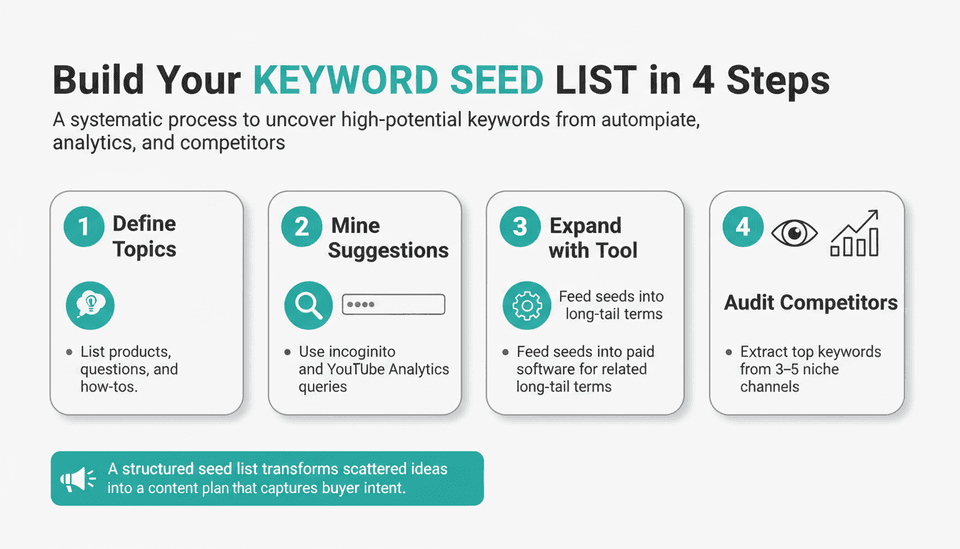
How to Generate a Seed List and Expand It
- Define your core topics. List all product categories, recurring viewer questions, and related how-tos. If you run a channel about home espresso, seeds might be “espresso machine,” “coffee grinder,” “latté art,” “brew ratio,” “best beans.”
- Mine YouTube’s own suggestions. Open an incognito browser, start typing a seed, and capture every autocomplete suggestion—those are real search phrases.
- Export your existing traffic data. In YouTube Studio → Analytics → Reach, pull the YouTube search queries that already drive views. These are proven winners you can double down on.
- Expand with a paid tool. Feed your seed list into a platform like Semrush or Ahrefs to generate hundreds of related long-tail terms, filtered by volume and difficulty.
- Audit competitor channels. Identify 3–5 channels in your niche that consistently rank. Use a tool to extract the keywords their top-performing videos target. Don’t copy; look for the underserved gaps they missed.
Worked example—home espresso channel:
- Seed: “espresso machine”
- Expanded with autocomplete + tool: “best espresso machine under $500 2026,” “espresso machine vs super-automatic,” “how to dial in espresso,” “beginner espresso setup shop.”
- Filter by intent: the commercial-investigation terms (“best… under…,” “vs”) go into a product-review content cluster; the informational ones (“how to dial in”) become tutorial videos that link to a paid course or an affiliate grinder.
This kind of intentional expansion turns a random video plan into a systematic keyword asset.
Analyzing Keyword Competition and Opportunity
Skip the green/yellow/red difficulty score until you have manually checked the top 5 ranking videos for a given keyword. Look for:
- Channel authority: are the top results all from channels with 100k+ subscribers, or can a sub-10k channel sneak in? If you spot a smaller channel with decent views, that’s a green light.
- Content quality: can you make a substantially better video—more thorough, better structured, more current, or better produced?
- Engagement gaps: low like-to-view ratios or few comments on top videos suggest an audience that wasn’t satisfied. You can win by closing that gap.
- Weak titles and thumbnails: if the top results are text-heavy and dull, your clickable thumbnail and curiosity-driven title steal clicks.
The decision rule: if at least one top-ranking video comes from a channel with under 10k subscribers and has fewer than 10k views, you can compete. If the top five are all from dominant, high-production channels, pick a more specific long-tail variant.
Optimizing Videos with Keywords: A Step-by-Step Framework
How do I choose the right keywords for my YouTube video?
Use a three-lens filter:
- Search volume potential—is anyone actually typing this?
- Competition—can your channel realistically rank near the top?
- Business intent—will this viewer buy, subscribe, or take your desired action?
Apply the Target Keyword Formula:
Primary topic + Differentiator + Intent qualifier.
Example: instead of “iPhone review,” go with “iPhone 17 Pro review for filmmakers” (differentiator = “for filmmakers,” intent = commercial investigation).
Validate it with the manual competition check above. Then confirm alignment with your product: if you sell video accessories, a tutorial that naturally showcases your gear creates a frictionless path to purchase. Integrating video keyword optimization into your production workflow means that every title, description, and tag works together to reinforce the target phrase.
Titles, Descriptions, and Tags That Rank
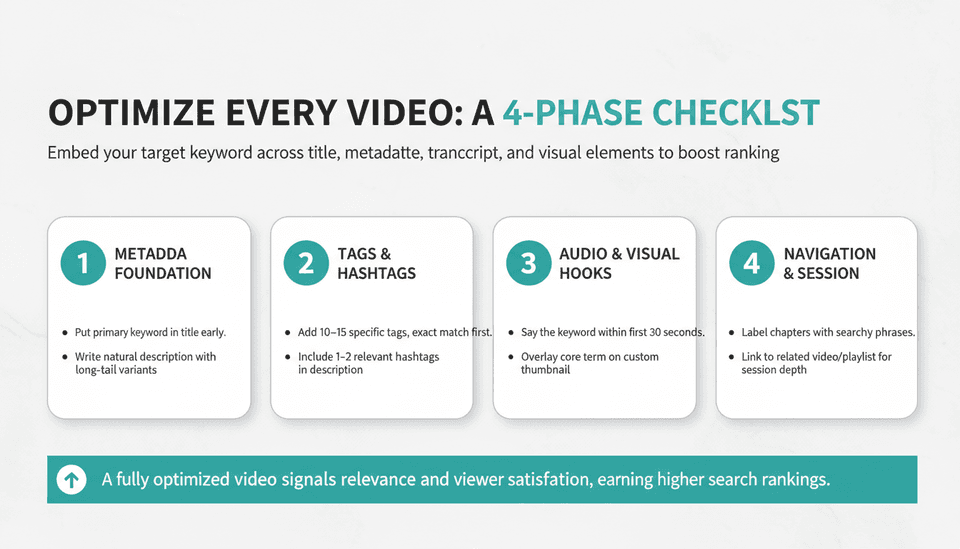
- Titles: front-load the primary keyword without making the title unreadable. Keep it under 70 characters so it doesn’t truncate in search results. Example: “SEO YouTube Keywords: The 2026 Definitive Guide” places the target phrase early.
- Descriptions: the first 200 characters must include the main keyword and a clear value proposition. Use the remaining space for meaningful paragraphs, timestamps, links, and a brief channel boilerplate—not a keyword dump. Google’s own advice is to write natural descriptions for users, not search engines.
- YouTube tags: place 10–15 specific tags, starting with your exact target keyword, followed by close variants, then broader related topics. Avoid tag stuffing; it does not help and looks unprofessional.
Here is a video optimization checklist you can use on every upload:
| Step | Action | When It Matters Most |
|---|---|---|
| 1. Primary keyword in title | Put the target keyword near the beginning, preserving readability. | Every video. |
| 2. Secondary keywords in description | Write 200+ characters that naturally include 2–3 long-tail variants. | For suggested-video traffic and Google video carousels. |
| 3. Video tags strategy | 10–15 tags: exact keyword first, then variants, then topic clusters. | Contextual clarity; minor but cumulative ranking benefit. |
| 4. 1–2 relevant hashtags | Add #Keyword in the description (visible above title on mobile). | Shorts discovery; niche hashtag pages. |
| 5. Verbal keyword early | Say your primary keyword within the first 30 seconds; auto-captions will index it. | Transcript-based retrieval. |
| 6. Keyword in custom thumbnail text | Overlay a 2–3 word hook that contains the core term. | Boosts CTR, which indirectly lifts ranking. |
| 7. Keyword-rich chapter timestamps | Label chapters with search-friendly phrases (e.g., “0:00 Best espresso machine”). | Can appear as “key moments” in YouTube and Google search results. |
| 8. Related video/playlist end screen | Link to another video or playlist targeting a connected keyword cluster. | Builds session watch time and channel authority. |
Channel-Level SEO Keywords (And Why They Still Count)
YouTube allows you to set channel-wide keywords that signal your broad niche. This doesn’t make a single video rank #1, but it helps the algorithm understand the theme of your entire body of work—especially important as AI-driven recommendations look beyond individual videos.
How do I find and add YouTube channel keywords?
To add them:
- Open YouTube Studio → Settings → Channel → Basic info.
- In the “Keywords” field, enter terms that describe your channel’s overall theme (up to ~500 characters). These are not per-video phrases but overarching buckets.
- What to include: your main topic, broad category names, your brand name, and major product groups. For a channel that reviews outdoor gear, you might enter: “outdoor gear reviews, hiking equipment, camping essentials, backpacking tips, best tents 2026.”
To decide which terms to use, review your top-performing video keywords and distill them into themes. Look at competitor “About” sections (they sometimes list channel keywords or broad descriptions). YouTube Studio may also suggest autocomplete terms when you click into the field—those hints can reflect how YouTube already categorizes your content based on existing uploads.
Why they still count: channel keywords serve as a tiebreaker when a video’s topic is ambiguous and act as a relevance signal for channel-level search results (when a user filters by “Channel” type). They’re a low-effort, set-once signal you should not leave blank.
Hashtags and YouTube Shorts: A Different Game
YouTube’s hashtag system adds clickable, topic-grouping links above your video title. They behave differently than tags: hashtags lead viewers to a collection of videos on that topic, and overusing them can get your video flagged.
Should I use YouTube hashtags?
Yes, but with restraint. YouTube’s policy states that using more than 15 hashtags across a video’s title and description can lead to penalties, and irrelevant hashtags may result in removal. Best practice: 1–2 highly relevant hashtags per video. For Shorts, the right hashtag (e.g., #Shorts plus a topic tag like #EspressoRecipe) can significantly increase your reach on the Shorts shelf and in hashtag-specific feeds. Use them to categorize, not to spam.
The 2026 Shift: Keywords for Product Promotion and Sales
For years, YouTube SEO guides told you to optimize for views. But in 2026, the conversation has pivoted toward revenue. As Search Engine Land’s November 13, 2026, guide on promoting products on YouTube spelled out, successful creators now align their keyword strategy with conversion goals—matching video topics to what viewers are ready to buy. This means your keyword research must include a deliberate filter for commercial and transactional intent.
Aligning Keywords with Buyer Intent
Commercial investigation keywords are the highest-value phrases for channels that promote products. Think: “best [product] under [price],” “[Product A] vs [Product B] 2026,” “is [product] worth it.” These queries come from viewers who have already moved beyond “how does it work?” to “which one should I pay for?”
Transactional keywords get even closer to the sale: “buy [product] unboxing,” “where to get [brand],” “[product] setup guide,” or coupon-related searches. If you carry affiliate links, run a merch shelf, or have a direct sponsor, these keywords pull in audiences that only need a small nudge to convert.
To find them, take your expanded keyword list and filter for phrases containing “best,” “review,” “vs,” “unboxing,” “buy,” “discount,” and the current year. Use a tool’s intent classification if available. Then, cross-reference your own sales data: which existing videos have driven the most affiliate clicks or store visits? Reverse-engineer their target keywords—those are your proven money terms.
Brand Deals, Merch, and Affiliate Revenue: Keyword Synergies
Your keyword strategy doubles as a sales deck. When pitching a brand for a sponsorship, a keyword report that shows you rank for “best budget DSLR for video 2026” tells them exactly which search real estate you own in their customer’s buying journey. That data turns a pitch from “I have X subscribers” into “I occupy the results page your buyers visit before choosing.”
For your own merchandise or courses, design a keyword-to-product content map. If you sell a video-editing course, target “how to edit faster in Premiere Pro” rather than a generic “Premiere tutorial.” The narrower, pain-point-driven keyword delivers the audience most likely to pay for a solution.
Cross-platform keyword synergy: use the same commercial keywords on your website’s blog and product pages. When your YouTube video targets “best coffee scale for pour over,” publish a companion blog post optimized for the same phrase. This dual-platform presence strengthens your overall search footprint and gives viewers multiple pathways to purchase. You can automate the written side with a platform that plans, writes, and publishes SEO-optimized articles, such as Joyrise, so your blog stays in lockstep with your video content without manual overhead.
How can I use YouTube keywords to promote products?
Build a keyword-to-product mapping table. List every product you promote—affiliate, owned, sponsorship—and for each, assemble 5–10 YouTube keywords a buyer might search before purchase. Then create videos that target those keywords, with clear calls to action (in-video verbal CTAs, description links, pinned comment with a tracked URL). Use UTM parameters or YouTube’s native link analytics to attribute conversions back to specific videos.
This turns your channel from a view accumulator into a measurable, scalable sales engine.
Scaling YouTube Keyword Strategy with AI and Automation
When to Use AI for YouTube SEO and Keyword Discovery
When applying AI for YouTube SEO, it can shorten two parts of your research loop:
- Idea generation. Give a tool like ChatGPT or a specialized SEO AI assistant a topic and a prompt such as: “Generate 50 long-tail YouTube keywords for ‘home espresso setup’ tagged with informational, commercial, or transactional intent.” You’ll get a raw list in seconds that would take hours to brainstorm manually.
- Competitive content analysis. Some AI platforms can ingest competitor transcripts and metadata to surface topics your niche has under-covered—gap analysis at speed.
Caution: AI output needs a human sanity check. It doesn’t know your brand’s unique angle, your actual inventory, or seasonality. It doesn’t access live search volume data unless paired with an API from a tool. Use AI as a first-pass generator, then validate through your paid keyword tool and manual SERP review.
Integrating YouTube SEO into Your Content Marketing Workflow
A business YouTube channel should not be an island. The keyword intelligence you gather there can fuel your website, email, and social strategy. If keyword research shows that “what is GEO in SEO” drives substantial YouTube traffic, you have a strong signal to write a detailed blog post on the same topic, embed the video, and capture email signups.
Coordinating this at scale is heavy work. As Search Engine Land reported on November 12, 2026, the latest enterprise SEO platforms emphasize automation in keyword research and cross-channel content workflows—helping teams sync video keyword performance with site rankings and spot content gaps across both mediums.
A recent practical demonstration published on YouTube (November 9, 2026) showcased ArtushVision AI’s automated metadata generation for microstock video sellers—covering AI-powered keyword tagging, title creation, and batch optimization. While the tool is built for microstock, the underlying pattern is directly transferable to YouTube creators: automated metadata generation can handle the repetitive parts of video SEO so you focus on production quality.
For the written content that supports your video topics, platforms like Joyrise can automatically plan, write, and publish SEO-optimized blog articles aligned with your YouTube keyword clusters. This keeps your website search presence growing in parallel without manual intervention, connecting the two channels where human bandwidth used to be the bottleneck.
What other AI tools can I use to improve my YouTube SEO?
Beyond core keyword tools, a practical stack might include:
- AI transcription tools (such as Descript or Otter.ai): they produce accurate captions you can edit to subtly reinforce target keywords, improving transcript-based indexing.
- AI video editors that auto-suggest chapters based on speech patterns—easy to turn into keyword-rich timestamps.
- AI content repurposing engines: turn a video transcript into a blog post, newsletter, or social snippet, extending the same keyword’s reach across platforms.
- Custom AI workflows: using a platform like ChatGPT and integrating API calls, some teams build a pipeline that takes a seed keyword, queries a tool’s data, filters for low-competition gems, and drafts a content brief. You can learn this approach through resources like How to Build Workflows With ChatGPT (2026 Guide).
- Enterprise cross-channel analytics: the class of tools highlighted by Search Engine Land offers unified dashboards for YouTube, Google, and social, making keyword performance visible in one place—overkill for a solo creator, but a decision-maker for a marketing team running a brand channel.
Keep your stack lean. One AI-augmented keyword tool, one transcription/repurposing assistant, and an automated content platform for blog integration often deliver 80% of the benefit without ballooning costs.
Common Mistakes, Myths, and What to Avoid
Even experienced creators get these wrong:
- Treating YouTube like Google web search. Exact-match keyword stuffing in titles and descriptions is counterproductive. YouTube’s NLP understands synonyms and context; write for humans first.
- Chasing volume without intention. A generic high-volume term that attracts curious clicks but no watch time actually hurts your channel’s authority signals.
- Leaving channel keywords blank. That field is a free, persistent classification signal—use it.
- Believing tags are dead. They are less powerful than in 2015, but still help with misspellings and ambiguous topics. Including them takes minutes and can edge out competitors who ignore them.
- Overloading hashtags. More than a couple of hashtags rarely helps; YouTube’s spam policy can penalize overuse, including removing the video from search.
- Assuming a “high” search volume equals traffic. A large number often means established creators own the SERP. A 500-search keyword you can rank #1 for often delivers more consistent views.
- Skipping business metrics. Tracking only views and subs while ignoring affiliate clicks or product sales means you never know whether your keyword strategy is profitable.
Measuring Success: KPIs Beyond Views
To justify your investment in YouTube SEO to a CEO, finance lead, or your own profit-and-loss, you need metrics that connect to revenue.
1. Search-driven revenue attribution. UTM-tag every product link in your video descriptions. In GA4, segment YouTube-sourced traffic and measure ecommerce conversions or goal completions. If you sell via YouTube Shopping, use the “Sales from your store” report in YouTube Analytics.
2. Keyword-to-lead mapping. If you’re after demo requests or newsletter signups, build a landing page per video campaign and track which keyword-targeted video delivers the most conversions.
3. Search impression share and CTR. YouTube Analytics surfaces impressions from search and CTR per video. A growing impression count with stable CTR means your keyword expansion is netting more real estate.
4. Topical authority score. Count how many of your videos rank in the top 10 for each core keyword cluster (use a rank tracker that supports YouTube, such as AccuRanker or Ahrefs). Growth here correlates with increased suggested-video traffic.
5. Assisted conversion path. In GA4, analyze the assisted conversions report where YouTube was a touchpoint. This captures the indirect influence of video content on eventual sales.
| KPI Category | Metric to Track | Why It Matters |
|---|---|---|
| Revenue | Affiliate / product-link conversions from YouTube | Direct ROI |
| Visibility | Search impressions & CTR | Keyword coverage quality |
| Authority | Top-10 rankings for target keywords | Long-term discovery muscle |
| Engagement | Watch time from search vs. suggested | Content satisfaction signal |
| Funnel Impact | Assisted conversions (YouTube channel) | Indirect revenue contribution |
The rule: a 1,000-view video that drives 50 sales outweighs a 50,000-view video that drives zero. Align your reporting with the business outcome that actually keeps the lights on.
Next Steps: Building a Future-Proof YouTube Keyword Strategy
The landscape will keep shifting—AI-powered answer engines, multimodal search, and deeper integration between YouTube and Google Shopping are all emerging. To stay ahead:
- Maintain a living keyword bank. Build a spreadsheet or a tool dashboard that tracks your target keywords, current rank, traffic, and conversion data, refreshed quarterly.
- Match keyword intent to video format. Some high-intent queries are best served by a crisp Short; others need a 20-minute deep-dive. Plan your production to fit the search intent.
- Design channel topic clusters, not just single videos. For each product line or theme, create a hub of 5–10 interlinked videos covering different keyword angles. Interlink them with end screens, cards, and playlists to build session watch time and topical authority.
- Automate the drudgery. Use AI for initial keyword expansion and metadata drafting; use an automated content platform to handle the written side of your content marketing. This frees you to focus on production and strategy.
- Watch the SERP features. YouTube regularly tests AI-generated video summaries, product carousels, and “key moments” in search results. Your keyword strategy should feed these: timestamped chapters, detailed descriptions that answer questions directly, and captions that include your core terms.
One concrete action you can take this week: Open YouTube Studio → Analytics → Reach, export the top 50 YouTube search queries that drove traffic in the last 28 days. Classify each by intent. For every commercial and transactional query that still lacks a dedicated video, put it on your production calendar for the next 30 days. That one exercise can pivot your channel toward revenue faster than any tool.
Key Takeaways
- SEO YouTube keywords are the discovery engine, but their 2026 value lies in connecting content to product sales — align research with buyer intent, not just search volume.
- YouTube search differs from Google: prioritize engagement signals; use keywords in titles, descriptions, transcripts, and channel settings, but avoid outdated stuffing.
- Free tools validate ideas; paid platforms unlock competitive analysis, cross-channel insight, and scalable systems — the cost is justified by a single high-converting video.
- AI and automation are now essential for efficient keyword research and content synchronization — use them to generate ideas, optimize metadata, and tie your video plan to your website’s SEO.
- Measure what converts: track affiliate and product revenue per video, not raw views, and build topical authority that compounds over time.
Ready to turn your YouTube keyword strategy into an integrated content engine that drives both discovery and sales? See how Joyrise automates the written side of your content marketing.