 Joyrise
ChatGPT Business Claim: The Strategic Guide
 By Alexi · · 14 min read

On this page
- What a ChatGPT Business Claim Actually Is (and Isn’t)
- How the Claim Process Works
- Why a Claimed Profile Changes Your AI Discoverability
- Post‑Claim Optimization: Going Beyond the Basics
- Business Agents: Are They Worth the Setup Yet?
- Integrating Your ChatGPT Profile into Your Content Strategy
- Myths, Mistakes, and Real Limitations
- Next Steps: Your 30‑Day Claim Action Plan
- Key Takea ways
A ChatGPT business claim verifies your AI presence. This guide covers verification, optimization, and leveraging it for local SEO and agent-driven sales.
OpenAI’s beta launch of Businesses in ChatGPT on November 10, 2026 finally gives every business a direct, verifiable presence inside the platform 1.2 billion people use weekly. A ChatGPT business claim is now the baseline for turning a random AI mention into a controlled asset—but the real leverage comes when you treat it as a discovery signal that feeds off the quality of what you publish elsewhere. This guide examines what claiming actually changes, where the practical limits sit, and how to build a content engine that makes your profile work long after the verification badge appears.
What a ChatGPT Business Claim Actually Is (and Isn’t)
To claim business on ChatGPT, you prove ownership of a business so that its name, details, and products can appear in ChatGPT as a verified entity rather than an unmanaged scrap of training data. You do it once through the ChatGPT Business Hub to assert control. It is not an advertising product, not a guarantee of preferential recommendations, and not a replacement for a website. Think of it as staking a flag in the same AI environment your customers already use to research, compare, and decide.
The shift from training‑data mention to verified presence
Before November 2026, ChatGPT could name your business only if it emerged from its static training corpus—unreliable, often stale, and completely outside your influence. Now, after you verify, you supply the facts. OpenAI’s introduction of Businesses in ChatGPT reported by Reuters and confirmed on OpenAI’s blog means that a business can inject current information—operating hours, services, product catalogs—directly into the model’s retrieval pipeline. The difference is analogous to an unclaimed Yelp listing versus one you actively manage: the first might exist; the second can be accurate.
What the claim unlocks: profile control, insights, and agent eligibility
Verification gives you three concrete assets:
- A ChatGPT business profile you can edit to reflect real operating status.
- An insights dashboard showing how often users encounter your business, what topics trigger those appearances, and basic engagement metrics.
- Eligibility to deploy a ChatGPT business agent (currently for U.S. e‑commerce and online service businesses) that can answer product questions, book appointments, or assist with purchases inside ChatGPT conversations.
None of these require a paid subscription. Claiming is free.
Can my business be named in an answer without a recorded mention?
Yes. ChatGPT can still reference a business purely from its underlying training data or by assembling information from the open web, even if the business has never claimed a profile. The “recorded mention” in the insights dashboard reflects retrieval-augmented generation (RAG) moments where ChatGPT’s system pulled from structured, verified sources. Unclaimed mentions happen, but they’re often incomplete and you cannot influence them. The claim flips that dynamic: you can supply canonical details, and when ChatGPT’s retrieval chooses your verified profile, the output reflects what you intended—not an outdated snippet from a forum.
How the Claim Process Works
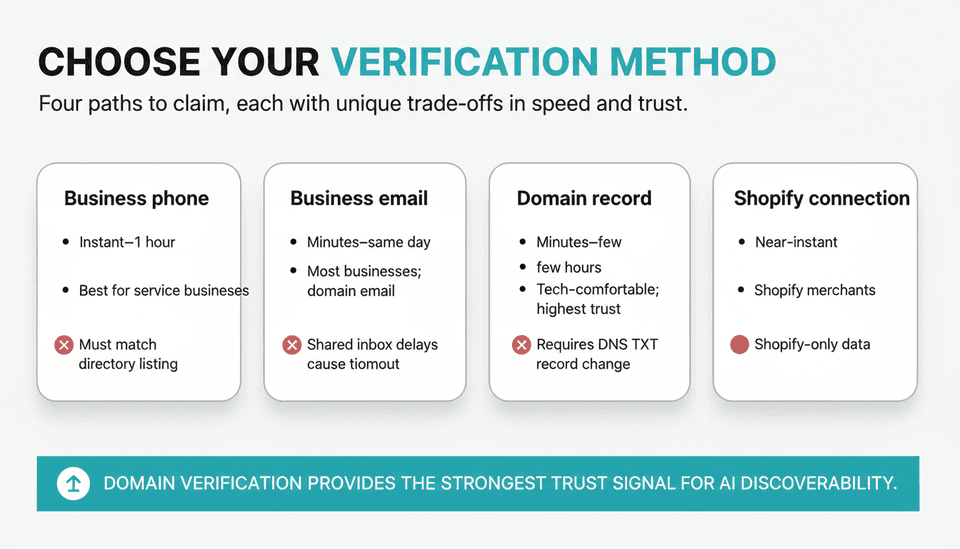
Head to the Business Hub (opens in a new window from ChatGPT) to verify business ChatGPT and complete verification. The mechanics are simple. The strategy around them is where most operators trip.
Verification methods: phone, email, domain, and Shopify
OpenAI business verification offers four paths. The table below summarises the trade‑offs you need to weigh before starting.
| Method | Speed (typical) | Best for | Limitation |
|---|---|---|---|
| Business phone | Instant–1 hour | Service businesses with a public number | Number must match an existing directory listing |
| Business email | Minutes–same day | Most businesses; requires access to a domain‑based email address | Shared inbox delays can cause timeout |
| Domain record | Minutes–few hours | Tech‑comfortable operators; highest trust signal | Requires DNS TXT record change |
| Shopify connection | Near-instant | Shopify merchants | Shopify-only data; won’t verify non‑Shopify operations |
Pick the method that aligns with the data you want to anchor your profile. A phone number works fast, but a domain verification tells the system your website is the source of truth—relevant if you care about AI-driven discoverability tying back to your domain.
OpenAI’s help documentation (mirrored in third‑party guides like GrowthX AI’s walkthrough) notes that you may need to confirm business category and location during the flow. Don’t rush those fields; they influence which topics show your profile.
Approval timelines and the pending‑verification black hole
Most verifications clear within a few hours. But plenty of operators hit a wall. If your verification sits in “pending” for more than 48 hours, the most common culprits are:
- Mismatched name or address between your submitted info and the public source used for validation.
- Using a personal Gmail address for a business email check.
- A DNS record that wasn’t propagated when OpenAI’s bot checked.
OpenAI doesn’t yet expose a detailed status log, so you’re left to re-read the rejection email (if any) and re-submit.
What should I do if my verification is pending or fails?
If pending: wait 72 hours, then force a re-check by switching to a different verification method. Domain verification is often more reliable than phone. If the phone check failed because your number wasn’t found, update your Google Business Profile or an authoritative directory first—OpenAI reportedly cross‑references such sources. If failed outright: don’t re-submit the same evidence. Change one variable. Many users on the OpenAI community forum report that a fresh domain-based claim after a phone failure broke the deadlock because it provided stronger proof. When all else fails, the Business Hub includes a support contact path (look for “Help” in the verification screen). Responses can take days, so start early.
Do I need to advertise or publish an agent to claim my business?
No. You do not need to run any ads, purchase any subscription, or deploy a business agent to complete the ChatGPT business claim. Claiming is a standalone, free identity action. Business agents are an optional add-on after verification. You can claim your profile, keep information current, and review insights indefinitely without ever enabling an agent.
How can I manage several brands or locations together?
OpenAI’s beta allows multiple businesses under a single account as long as each is verified separately. The flow: claim the first business, complete verification, then from the Business Hub click “Add business” and repeat. There is no consolidated dashboard that merges insights across entities yet—you’ll need to toggle between profiles. For franchises or multi-location retail, this means one verification per distinct address or DBA. Centralized management of details (e.g., bulk update of hours) is not available; you either delegate a person per location or rely on a service that can push consistent data. Plan for manual effort if you run more than five locations; otherwise, the overhead is manageable.
Why a Claimed Profile Changes Your AI Discoverability
Verification alone will not send a flood of ChatGPT-driven leads. The strategic value comes from what it enables downstream: a structured signal that feeds the same kind of consistency signals that search engine algorithms have rewarded for years.
Will claiming my business make ChatGPT recommend it more often?
The straightforward answer: not by itself. OpenAI has not stated that verified profiles receive ranking boosts inside ChatGPT’s retrieval system. However, a verified profile gives the model a reliable data anchor. When a user asks “best pizza near me open now,” ChatGPT’s retrieval logic can fetch a verified business with matching hours and good location data while ignoring an unverified one with conflicting information. Over thousands of queries, that precision increases the odds your business appears when it is relevant. It’s not a promotion; it’s a signal hygiene play. VentureBeat described the program as giving businesses “a way to manage their information,” noting that agents and profiles create more accurate interactions—not higher rankings.
The indirect SEO value: consistent NAP‑like signals for LLMs
In local SEO, consistent name–address–phone (NAP) data across the web improves Google ranking. ChatGPT for local businesses works similarly: when your claimed profile, website, Google Business Profile, and major directories all agree, the model’s confidence in your entity rises. That lowers the chance of hallucinated competitors or wrong details. In a world where generative engine optimization is becoming a measurable practice, a verified ChatGPT profile acts as a new, important consistency node. It’s not a direct ranking factor, but it conditions the retrieval environment favourably—much like fixing broken citations used to boost local pack visibility.
How user behavior is already shifting and why that matters now
ChatGPT’s weekly active user base hit 1.2 billion by late 2026. Inc.com noted that the feature helps small firms “get their products discovered in the AI chatbot.” That phrase matters: users are treating ChatGPT as a discovery engine, not just a Q&A tool. They ask “what hiking boots should I buy” and expect brand names. If your verified profile includes detailed product descriptions and inventory signals, ChatGPT can surface you in that conversation. Every month you remain unverified is a month that a competitor’s accurate profile gets chosen instead.
Post‑Claim Optimization: Going Beyond the Basics
Claiming opens a door; what you do after determines whether anyone walks through.
Keeping information fresh—and why stale data hurts
If ChatGPT’s retrieval layer sees that your claimed hours were last confirmed eight months ago, it may still serve them—but with a confidence decay. Worse, a user who acts on stale data (shows up when you’re closed) has a poor experience they won’t attribute to the AI—they’ll blame your brand. Set a calendar reminder to review your profile every 30 days. Any operational change (holiday hours, new service area) must go into the Business Hub immediately. This is not a “set and forget” asset. Stale data is worse than no profile at all because it actively misinforms.
Why haven’t my updated business details appeared yet?
Changes can take anywhere from a few hours to 72 hours to propagate into ChatGPT’s live responses, according to early adopter reports and OpenAI’s support language. The lag depends on whether the system has already cached your old information in its retrieval index. If you changed your phone number or address, re-verify the updated field if the platform prompts you. After 72 hours, if the old details still surface, reach out to support through the Business Hub help link. The most reliable way to avoid prolonged delays is to make changes infrequently and completely—half‑updated profiles confuse the validation layer.
Connecting product feeds and structuring data for agent‑ready responses
For e‑commerce businesses in the U.S., connect your Shopify store inside the Business Hub. That pushes live inventory, pricing, and product descriptions into ChatGPT’s retrieval index. Even if you never enable an agent, this data makes plain-text answers richer. If you sell through a custom platform, you cannot yet directly feed inventory; you must manually update your product list or use an intermediate catalog. Structure product names and attributes as you would for rich search snippets: clear, distinct, and free of marketing fluff. When a user asks “show me cordless drills under $100,” ChatGPT’s system can more easily parse a feed item labeled “Cordless Drill 20V – $89” than “The Ultimate DIY Companion.”
Using the insights dashboard to feed your real‑world content calendar
The ChatGPT business insights tab tells you which discovery topics triggered your business. If you see “best project management software for agencies” appear repeatedly, that’s a content brief—not a prompt to edit your profile, but to write a detailed article on your website that addresses exactly that query. A strong on‑site page gives the model more substance to pull from when it retrieves your verified entity. The insights dashboard is your AI‑powered editorial compass; ignore it at your own cost.
Business Agents: Are They Worth the Setup Yet?
Business Agents let you deploy an automated conversational agent inside ChatGPT that can interact with customers on your behalf. VentureBeat explained they function as “custom agentic AI customer sales reps.” The potential is obvious. The current limitations are less obvious—and they matter.
Do I need Shopify to set up a business agent?
For transactional agents that can handle purchases or bookings, Shopify integration is the only path OpenAI launched with. If you use WooCommerce, Magento, or a custom stack, you cannot launch a purchase-capable agent today. You can still deploy a conversational agent that answers questions and recommends products, but it cannot collect payment or check order status without Shopify. That’s a hard constraint for many service businesses.
Can my agent complete purchases or check orders?
If you are a U.S. Shopify merchant, yes—but with boundaries. An agent can guide a customer through product selection, answer availability questions, and facilitate a transaction that is processed through Shopify’s checkout API. It cannot modify existing orders, process refunds, or handle partial shipments. For service businesses (e‑g., salons, consultants), the agent can book appointments if you integrate a compatible scheduling tool, but order checking isn’t applicable in the same way. The Next Web reported that firms can “run their own Business Agents,” but the capabilities tilt heavily toward simple e‑commerce sales motions today.
E‑commerce vs. service businesses: two very different equations
- E‑commerce with Shopify: immediate value. Your agent can answer product queries based on live inventory, reduce repetitive support tickets, and complete transactions. Set it up as soon as your feed is clean.
- Service businesses without Shopify: limited value today. You can deploy a FAQ agent, but it cannot take a booking unless you’ve built a custom integration. The setup time often outweighs the benefit until OpenAI opens new connectors. Waiting is a rational choice.
When waiting is smarter than rushing in
If you sell complex B2B services, operate outside the U.S., or rely on non‑Shopify e‑commerce, hold off. A half‑functional agent that gives wrong availability or fails to complete a task damages trust more than having no agent at all. Focus your energy on the claims profile, insights, and content strategy. OpenAI will expand agent capabilities; many expect broader platform support within 12 months. The early-adopter advantage isn’t large enough to justify a rushed, broken experience.
Integrating Your ChatGPT Profile into Your Content Strategy
A claimed profile cannot compensate for a weak website. The relationship runs the other way: what you publish on your domain heavily influences what ChatGPT can say about you when it retrieves your profile for synthesis. Your ChatGPT SEO strategy must combine on-site authority with a verified profile to feed the retrieval engine consistently.
How on‑site content influences what ChatGPT says about you
ChatGPT’s retrieval mechanism does not limit itself to the profile fields you fill out. It often scrapes your website’s content to form a fuller answer. If a user asks “What warranty does Acme Tools offer?” and your profile is sparse but your website has a thorough Warranty page, ChatGPT can surface that page’s information alongside your verified name. That’s how you move from a short mention to a substantive recommendation. Every key product, policy, and use‑case page you publish becomes part of your AI discoverability surface.
Building topical authority that AI models recognize
Topical authority—the signal that you are a definitive source on a subject—matters to LLMs because they prioritize entities associated with high-confidence content clusters. If your site publishes consistent, in‑depth articles on “remote team communication tools” and your ChatGPT profile connects to that domain, the model is more likely to retrieve your business when queries involve that topic. This is not about keyword density; it’s about sustained, authoritative publishing. A single blog post won’t do it. A library of interlinked, clear articles will.
Automating the content supply chain so your profile never runs on empty
Maintaining the content volume needed to keep your site relevant to LLM retrievers is the largest operational challenge. This is where automation changes the equation. For businesses running on Webflow, a platform like Joyrise can continuously publish SEO‑optmized, researched articles that reinforce your topic clusters, freeing your team to focus on operational updates for the ChatGPT profile. The pattern works without automation too, but it requires a disciplined editorial rhythm. Whatever method you choose, the rule is the same: your profile is only as strong as the content ecosystem that surrounds it.
Myths, Mistakes, and Real Limitations
‘Claiming is just for big brands’ and other false beliefs
Small businesses benefit more, not less. Catalogueing 50 products a customer can browse in ChatGPT levels a playing field previously tilted by brand recognition. “It’s too complicated” is another myth; the verification process, while occasionally glitchy, averages under 15 minutes. The barrier is not technical—it’s awareness and follow‑through.
The most common post‑claim mistakes (and how to avoid them)
1.Treating the profile as a one‑time task. Plan a monthly review; absence makes data stale. 2.Omitting structured data on the website. If your domain lacks schema markup (e.g., LocalBusiness, Product), the retrieval layer has less to parse. Add it. 3.Ignoring the insights dashboard. It’s free market research. Use it to inform content choices. 4.Enabling an agent before testing. Ask it the ten most common customer questions and verify answers against reality. Fix before public launch.
What OpenAI hasn’t built yet—and what it might mean for your visibility
No bulk management tools, no multi-language profile support, no automated data syncing from third-party platforms (except Shopify), and no public ranking transparency. These gaps mean your profile requires manual stewardship and that you cannot optimize visibility with the same granularity as Google Business Profile. If OpenAI doesn’t provide clearer ranking signals, the indirect content path becomes even more critical. Don’t wait for feature parity; build the content moat now.
Next Steps: Your 30‑Day Claim Action Plan
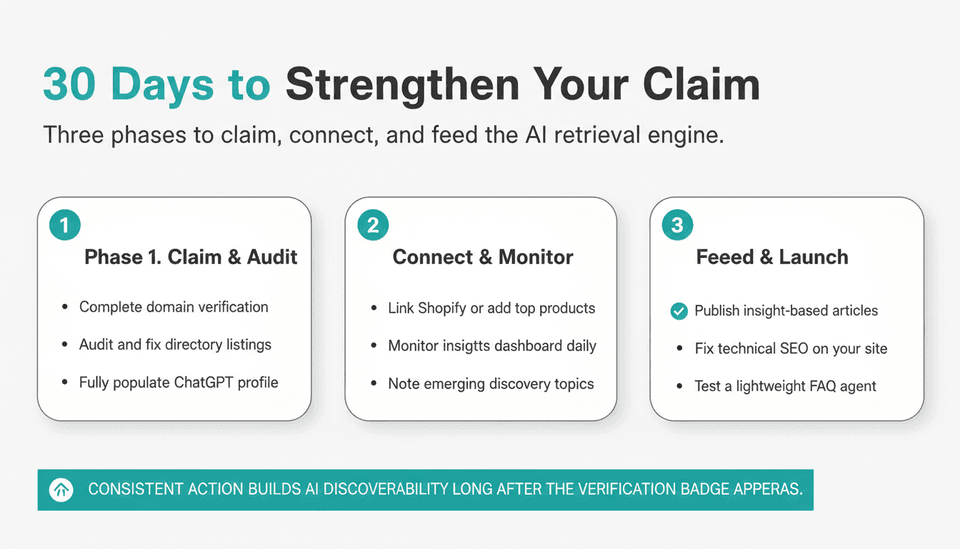
Day 1–7: claim, verify, audit your existing info
Log into ChatGPT, navigate to the Business Hub, and claim your primary business using domain verification. While you wait, audit your Google Business Profile, Yelp, and other directories. Fix discrepancies. Populate every field in the ChatGPT profile: description, hours, URL, social links.
Day 8–21: connect product feeds, watch the insights tab
If you’re e‑commerce, link Shopify. If not, manually load your top 20 services or products. Monitor the insights dashboard daily for five minutes. Note emerging topics; you’ll turn them into content briefs.
Day 22–30: feed the engine with new, agent‑targeted content
Publish at least two high‑quality articles based on insights topics. Ensure your site’s technical SEO (schema, fast loading, internal linking) is clean. If it makes sense for your business, configure a lightweight conversational agent that handles FAQs only; do not connect commerce until you’ve tested answers. Set a recurring 30‑day calendar hold for profile review.
Key Takea ways
- A ChatGPT business claim is a free, foundational identity step that gives you profile control and insights, but not automatic recommendation boosts.
- Profile accuracy and consistency across the web create the conditions for AI retrieval to favor your business—similar to NAP hygiene for traditional local SEO.
- Post‑claim success depends on a ruthlessly maintained profile, connected product data, and high‑quality on‑site content that feeds the retrieval engine.
- Business Agents offer real transactional potential for Shopify e‑commerce now; for most service businesses, waiting for broader integrations is the smarter play.
- The insights dashboard is your real‑time discovery lab; use it to guide content investment, not just to admire your mention count.
Ready to build the content engine that turns a claimed profile into actual AI discoverability? Start publishing daily, researched articles to Webflow with Joyrise.