 Joyrise
Best Free SEO Tools in 2026: What's Actually Free
 By Alexi · · Updated · 22 min read

On this page
- Best free SEO tools at a glance
- How this shortlist was built
- The shortlist compared
- The tools in detail
- What ‘free’ actually means: four free‑tier models and the limits that bite
- Free tool data is not ground truth: how to sanity‑check the numbers
- AI visibility on a zero budget: what you can actually measure
- The gap free tools can’t close: research is not publishing
- Credible options considered but not selected
- Buyer checklist: choosing free SEO tools for your own stack
- What’s a smart implementation workflow for resource‑constrained teams?
- FAQ
- Key Takeaways
Every best free SEO tools list hands you a catalogue of features. None hands you the line where free stops—the exact cap that breaks your workflow, the data that stays hidden, the export you don’t get until you pay. This article scores each tool on its free‑tier reality, not its feature count, and adjudicates two fights the SERP ignores: vendor‑authored lists ranking their own products, and the November 2026 reports that Google is returning incorrect results to automated rank tools. It closes with the gap no tool on any list fills: free research still has to become published, indexed content, and that is the real cost line.
Best free SEO tools at a glance
Best for baseline truth on your own site: Google Search Console
First‑party clicks, impressions, queries, index coverage, and Core Web Vitals—straight from Google, no sampling calibration required. Google Search Console free is the single source of performance truth you can cross‑check against every other dashboard. Free and non‑negotiable.
Best free demand data with caveats: Google Keyword Planner
The default free keyword research tool for search volume. Unless you’re running active ad spend, volumes appear as ranges (for example, 1K–10K), not exact numbers. Ranges are directionally useful; treat them as relative signals, not precision inputs for a forecast.
Best free backlink and site‑health data for properties you own: Ahrefs Webmaster Tools
Free backlink checker and site audit for verified domains. You get the top 100 backlinks, a limited crawl, and a few core health metrics. Everything beyond that stays behind the paywall, but for a small site, it’s the most credible free glimpse at your off‑page profile.
Best free peek at competitor and keyword data: Semrush free account
A daily cap of 10 searches across tools like Keyword Magic Tool and Position Tracking, zero exports, and limited rows returned. The free account answers the question “What could I see if I paid?”—it’s a taster, not a working daily driver.
Best free desktop crawler for small sites: Screaming Frog (free version)
A real desktop SEO audit tool that hits a hard 500‑URL crawl limit. Perfect for a small Webflow site or a landing‑page project; irrelevant the moment your site exceeds 500 pages. Exports are fully functional within the cap, so the data you get is complete.
Best free relative‑demand and seasonality signal: Google Trends
Relative interest, not absolute volume, plotted over time and by region. No numbers you can put in a spreadsheet, but the shape of demand—and whether a topic is rising or falling—is a free signal no other tool gives.
Best free behavioral evidence: Microsoft Clarity
Heatmaps, session recordings, rage clicks, dead clicks—unlimited and free forever. It won’t tell you a thing about rankings, but it will show you exactly what visitors do after they land, which is often the diagnostic a ranking report can’t provide. Unlimited sessions, no bill.
Best free question mining: Answer the Public
Visual maps of questions people type around a topic, powered by Google autocomplete data. Free plan: 3 searches per day, view‑only results—no CSV, no images. Useful for content briefs if you stay disciplined about the cap.
Best free second index and index diagnostics: Bing Webmaster Tools
A free Google Search Console equivalent for Bing, plus some diagnostics—like SEO reports and inbound link data—that Bing presents more plainly than Google does. A cheap way to spot index problems that might be invisible in GSC alone.
How this shortlist was built
The candidate universe: what counted as a free SEO tool
Any tool that delivers SEO‑relevant data or capability—keyword demand, ranking position, backlinks, site health, behavioral signals, or AI‑assistant citations—with a genuine free tier that does not require a credit card to function for more than 7 days. Tools that gate their data behind a “free trial” of a paid plan were excluded from the shortlist; they aren’t free tools, they’re sales windows.
The five criteria every tool had to pass
- Persistent free access — no 14‑day trial masquerading as free.
- SEO‑unique data — the tool must produce information you cannot get by simply staring at your own site analytics.
- Known cap, not a surprise wall — the limit is public or easily discovered within 30 minutes of use.
- Export or actionable output — you can take the data out and use it, even within the cap.
- No dependency on a single vendor’s paid funnel — a free tier that only makes sense as a step toward that company’s paid plan still qualified, but only if the free data itself is usable standalone.
What was excluded, and why (including tools that are ‘free’ only inside a trial)
- Majestic free: useful link data, but the free plan is so heavily throttled that a new user can barely assess it, and the interface essentially funnels you toward paid.
- SEO PowerSuite free: a desktop app with a trial‑length license, not a persistent free tier.
- Any tool requiring a credit card to activate the “free” window: not actually free—it’s a trial that auto‑converts.
- GA4: critically important for analytics, but not an SEO tool. It shows traffic behavior, not search visibility or ranking data. I consider it outside the candidate set.
- ChatGPT, Perplexity, Claude: they can help you think about SEO, but they don’t provide ranking, index, or demand data. They’re research aids, covered later in “Credible options considered but not selected.”
How to read a vendor‑authored list without being played
Semrush’s own blog, 6 days ago, published “7 free SEO tools to boost visibility & traffic” — a list that places Semrush’s own free tools among its top picks. Treat vendor pages as authoritative documentation of their own free‑tier terms, never as an independent ranking. When I need to know the exact limit of the Semrush free account, I go to Semrush. When I need a comparative judgment of whether that free account beats Ahrefs Webmaster Tools, I go to a third party like Marketer Milk or Zapier’s tested roundups—but only where the testing method is stated. The shortlist above is built on that principle: each tool’s documented limits, cross‑checked against external reports, not against the vendor’s own marketing priority.
The shortlist compared
| Tool | Free‑tier ceiling | What’s withheld | Export limits | Account required | Best for |
|---|---|---|---|---|---|
| Google Search Console | Unlimited for verified properties; query data may be sampled for very high‑traffic sites | No cost, but historic data retention limited to 16 months; some reports show only top 1,000 rows | Export up to 1,000 rows per report; no API request costs but daily usage quotas can flag automated pulls | Google account | Basline truth on your own site |
| Google Keyword Planner | Unlimited searches; volume shown as ranges unless you’re actively spending on Ads | Exact search volumes hidden behind ad spend thresholds; competition columns are AdWords‑specific, not organic difficulty | CSV export of plan data, but ranges only | Google Ads account (free to create) | Free demand data, range‑only reality |
| Ahrefs Webmaster Tools | Site Audit: 5,000 crawled pages per project; Backlinks: top 100 per verified domain | Full backlink index, most DR/UR metrics, historical data, content explorer, rank tracker | Backlinks only the visible 100 rows; Site Audit reports exportable | Verified domain ownership | Free backlink and site‑health data you own |
| Semrush free account | 10 searches per day across Keyword Magic Tool, Position Tracking, and others; limited rows | No exports; data truncated (e.g., only top 10 keywords shown in some reports); no historical ranking data | Zero—export locked behind any paid plan | Email sign‑up | Peek at competitor and keyword data |
| Screaming Frog free | 500‑URL crawl per session; full feature set (audit, redirects, hreflang, structured data) | Cannot save and reload crawls; no ability to resume or merge multiple crawls | Full CSV/Excel export of all crawled data within the 500‑URL limit | None (desktop install) | Small‑site technical crawl |
| Google Trends | Unlimited queries; relative interest index over time/region | No absolute volume numbers ever; data is normalized and sampled for speed | CSV of index data, graphs | Google account | Relative demand and seasonality signal |
| Microsoft Clarity | Unlimited sessions, unlimited recordings, unlimited heatmaps | No ranking or SEO data; strictly behavioral | Data export via CSV (session details, heatmap click data) | Microsoft account | Behavioral evidence at zero cost |
| Answer the Public | 3 free searches per day | No export to CSV or image; view‑only results; no filtering beyond the query | None on free | Email sign‑up | Question mining, hard cap |
| Bing Webmaster Tools | Unlimited for verified sites; similar to GSC for Bing index | Bing‑only data (does not include Google or other engines); some reports limited to 1,000 rows | Export up to 1,000 rows per report, CSV | Microsoft account | Second index and index diagnostics |
The tools in detail
Google Search Console: the only free tool with first‑party data
No other free tool sees your site the way Google sees it. GSC gives you queries that actually sent impressions and clicks, the exact pages Google indexed, Core Web Vitals field data, and manual action notices. It’s the only free SEO audit tool for your own property that carries zero calibration error, because it isn’t an estimate — it’s the server log of Google’s interaction with your pages.
What it doesn’t do: competitor data, keyword volume outside your own queries, backlink profiles. Pair it with any tool that adds those, but never replace it. If you have 30 minutes a week for free SEO tools 2026, spend 20 inside Search Console.
Google Keyword Planner: free demand data, range‑only reality
Google Keyword Planner remains the default free keyword research tool because it pulls directly from Google’s ad backend. The catch: without active spend, you see ranges. “1K–10K” is not the same as 5,200. If you’re building a revenue model off those numbers, you’re building on sand. Use the ranges to compare relative demand across keywords—planner tells you that query A is likely larger than query B—and don’t treat any single number as exact until you’re paying for impressions and can calibrate.
Ahrefs Webmaster Tools: what you get free versus what stays behind the paywall
After verifying ownership, Ahrefs Webmaster Tools provides a site audit (up to 5,000 pages), the top 100 backlinks, a few DR/UR metrics, and some internal link data. It’s the most credible free backlink checker for owned sites because Ahrefs’ link index is genuinely deep. But the free tier withholds the vast majority of the index, historical backlink growth, and any competitor data—features that make the paid subscription the standard. Use it for a clean audit and a quick backlink sanity check; don’t expect to run a link gap analysis.
Semrush free account: the daily cap and what you burn it on
Semrush’s free account is a marketing sample, not a toolset. You get roughly 10 requests across Keyword Magic Tool, Position Tracking, and a handful of other tools per day. No exports. Results are capped—often to the top 10 rows—so you see enough to get curious but not enough to act. For a one‑person team that needs a quick idea of a competitor’s keyword set, it works. For a weekly workflow that relies on fresh rank data, the cap breaks by Tuesday.
Screaming Frog free: the 500‑URL ceiling and who it actually fits
A desktop crawler that gives you a full technical SEO audit: broken links, redirect chains, missing titles, duplicate pages, hreflang tags. The free version does everything the paid version does, but can only crawl 500 URLs per session. For a small Webflow site, a micro‑SaaS landing page, or a brochure site, that’s all you need. For any site above 500 pages, the free version becomes a toy—you can’t resume or merge crawls, so you never get a full picture. It’s the best free SEO audit tool for a narrow range of site sizes, and useless outside it.
Google Trends: the only free relative signal, and its blind spots
Google Trends gives you normalized interest over time—0 to 100—not search volume. It tells you that a topic peaked in June and declined in September, not how many people searched. It’s invaluable for spotting seasonality, comparing broad topic interest, and winning arguments about whether a trend is growing or dying. It’s useless for forecasting traffic. Combine it with Keyword Planner to get direction plus relative scale, but never mistake a Trends spike for a traffic guarantee.
Microsoft Clarity: behavioral evidence that costs nothing because it’s not SEO data
Clarity records real user sessions, mouse movements, rage clicks, and scroll behavior—unlimited and free forever. It’s not an SEO tool; it’s a conversion and UX tool. But because SEO traffic often converts differently than paid traffic, Clarity is free behavioral evidence you can layer onto your Search Console query data to see whether the people arriving from organic search are actually getting what they came for. No paid SEO suite offers that at zero cost.
Answer the Public: question mining with a hard query cap
It takes a keyword and returns a web of “what,” “why,” “how,” and “comparison” questions sourced from Google autocomplete. The free plan gives 3 searches per day, view‑only. You can’t export the data, so you’ll end up screenshotting or manually copying. For a quick content brief, 3 searches a day is enough; for a systematic topic cluster build, you’ll outgrow it quickly.
Bing Webmaster Tools: a second index and a cheaper way to spot index problems
Because Bing’s index is smaller and less forgiving than Google’s, problems like noindex tags, redirect loops, or canonical mismatches often show up here before they’re visible in GSC. Bing Webmaster Tools also surfaces backlinks more generously than GSC’s link report, without the 100‑link cap of Ahrefs’ free tier. It’s free, and the account setup is minimal. Worth connecting even if you think Bing traffic is negligible—it’s a diagnostic pane Google won’t give you for free.
What ‘free’ actually means: four free‑tier models and the limits that bite
Before diving into the models, it’s worth asking the free vs paid SEO tools question: when do free limits actually cost you more than a subscription? The answer isn’t always obvious. A free tier that stops just short of your weekly need turns “free” into a recurring labor drain.
Free forever, free tier, free trial, free widget — they fail differently
- Free forever (e.g., Google Search Console, Clarity, Trends): you never pay, but the data is owned by the platform and you have zero leverage if the interface changes. Limits are high, but you accept the data as‑is.
- Free tier of a paid platform (e.g., Ahrefs Webmaster Tools, Semrush free account, Answer the Public): deliberately capped to upsell you. The free data is a sample, and the cap is designed to frustrate just before the value becomes repeatable.
- Free trial masquerading as free: not on this list. A 14‑day credit‑card‑gated window is a sales funnel, not a free tool.
- Free widget (e.g., small embeddable rank checkers): often free but untrustworthy—data freshness and source are opaque. Not included unless they meet the five criteria.
SEO tool free tier limits: volume caps, withheld data, and export/seat restrictions
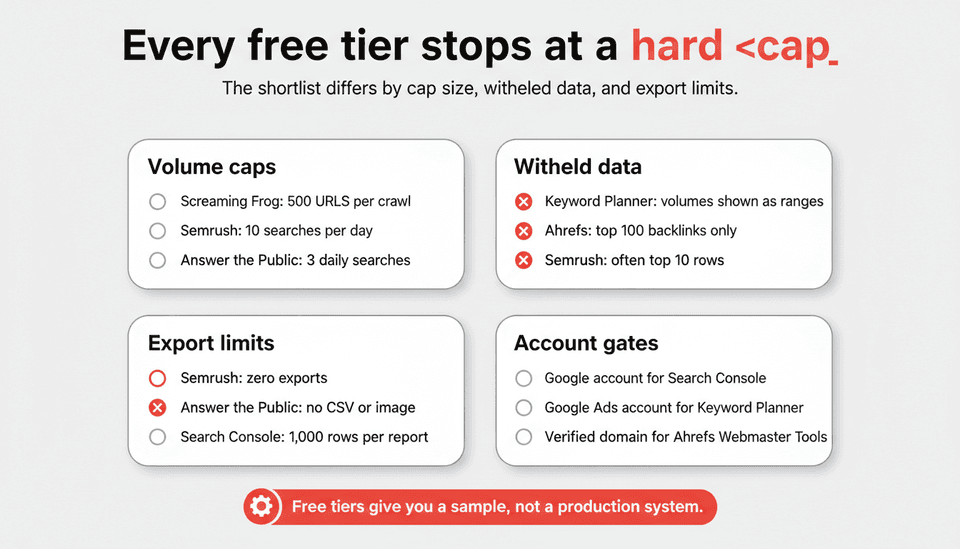
- Volume caps (Screaming Frog’s 500 URLs, Semrush’s 10 searches/day, Answer the Public’s 3 queries) are binary: you’re either inside them or you can’t work. If your site or your daily research habit exceeds the cap, the tool disappears.
- Withheld data (Keyword Planner’s ranges, Ahrefs’ truncated backlink list, Semrush’s 10‑row snippets) means the free tier answers the “what” but not the “how much.” You get enough to see a pattern, but not enough to size the opportunity.
- Export and seat limits (Semrush zero export, Answer the Public no CSV) means the data exists only inside the tool’s UI. You can’t merge it into a spreadsheet, a dashboard, or a briefing doc without manual copying, which is where hidden labor cost creeps in.
How to map your workflow to a free tier before you commit to it
List the three decisions you make every week with SEO data (e.g., “Which 3 keywords do I target this week?”, “Is the site technically clean?”, “What page needs an update?”). For each decision, identify the minimum data shape you need—10 keywords with volume, full crawl for a 200‑page site, 100 backlinks for a domain—and then check whether the free tier delivers that shape inside its cap. If it doesn’t, that tool is a demo, not a working part of your stack.
Free tool data is not ground truth: how to sanity‑check the numbers
Why automated rank data wobbles (November 2026)
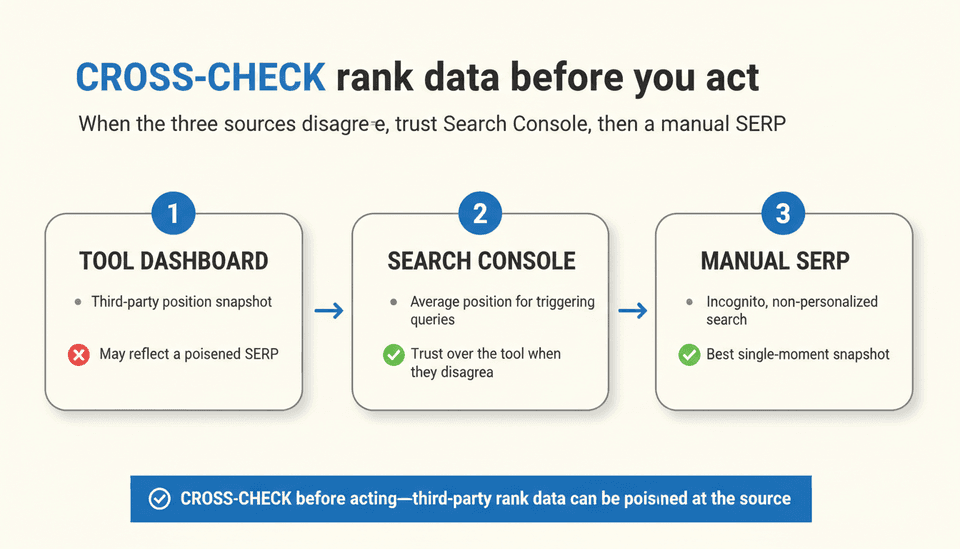
On November 2, 2026, Semrush confirmed that Google is returning incorrect search results to certain automated rank‑tracking tools, joining several other SEO tools reported to be affected (ALM Corp, 6 hours ago). This isn’t a one‑off glitch—it’s a structural signal that third‑party rank data can be poisoned at the source, and no free tier rank checker is immune. When you look at a position number from any tool, you’re seeing a snapshot that may have been served a manipulated SERP.
The three‑source check: dashboard, Search Console, manual SERP
Before you act on a rank change, cross it against:
- The tool’s own reading (your dashboard).
- Google Search Console’s average position for that query (if it triggers impressions).
- A manual, non‑personalized search in an incognito window (to spot obvious deviations).
If all three disagree, trust Search Console over the tool, and the manual SERP over Search Console for a single‑moment snapshot.
Signals that a metric is range‑only or interpolated and shouldn’t drive a decision
- Keyword volume shown as “10K–100K” or a flat range without a confidence interval: the data is rounded to a bucket. Use it for filtering, not forecasting.
- Backlink counts that round to 100: the tool is capping visibility, not reporting reality.
- AI‑visibility scores (like “AI answer engine share”) that are new and uncalibrated: most free dashboards won’t disclose their sampling method. Record the number, but don’t make a budget decision on it until you’ve seen it stay stable for 4–6 weeks.
When you need a deeper guide on which Google‑sourced metrics are genuinely reliable, the Google SEO Tools: A 2026 Guide to What to Trust walks through verification workflows in detail.
AI visibility on a zero budget: what you can actually measure
Free signals worth collecting weekly (and how to log them without a paid seat)
- Search Console “ChatGPT” or “AI”‑branded queries: inside the Performance report, filter queries containing “chatgpt,” “ai mode,” or known assistant referral strings. You’ll see impressions and clicks from AI surfaces that pass through Google’s own referral. Log these manually in a spreadsheet weekly—it’s crude, but it’s a free AI visibility signal.
- Bing Webmaster Tools referral patterns: some AI answer engines pull from Bing’s index. Bing’s query reports can show you if a third‑party assistant is surfacing your pages.
- Clarity recordings filtered by referrer: if an AI platform sends traffic through a distinct referrer string, Clarity catches the session. No dashboard will name it, but you’ll see the behavior.
What no free tier exposes, and when that gap starts costing more than a subscription
No free tool provides a unified AI citation dashboard—the kind of monitoring that paid platforms like Liferay’s just‑announced beta SEO & AEO Studio (Yahoo Finance / GlobeNewswire, 9 hours ago) or Semrush’s AI‑visibility add‑ons are consolidating. Free tools give you fragments: a query filter here, a referrer log there. After about 2–3 months of manual stitching, the labor cost of collecting those fragments exceeds the cost of a mid‑range paid plan. That’s the hidden line between “free is free” and “free costs you in hours.”
For a practical breakdown of which AI surfaces are even trackable today, ChatGPT GEO: A Practical Guide to AI Answer Visibility explains how to prioritize your monitoring effort.
The gap free tools can’t close: research is not publishing
Free research sets a cadence you then have to produce and ship
Keyword research tells you what to write. Site audits tell you what to fix. Neither writes the article, formats the heading structure, generates the image, or publishes it to your CMS. Every free SEO tool stops at the brief. A team that exhausts free research but can’t ship content at the cadence the research implies ends up with a growing to‑do list and zero new indexed pages. The most expensive free tool stack is the one that creates more plans than it publishes.
The real cost comparison: hours per published article versus a subscription
If a free tool stack gives you a keyword target, a question cluster, and a technical green light, and you then spend 6–8 hours writing, editing, formatting, and publishing one article, your cost isn’t zero—it’s the loaded hourly rate of whoever did that work, multiplied by the number of articles your keyword opportunity demands. At a modest $40/hour, 30 articles a month costs $7,200–$9,600 in labor. A platform that automates much of that production for a fraction of the cost—like Joyrise, which plans, writes, and publishes daily illustrated articles directly to Webflow—is not competing with free tools; it’s competing with the production gap they can’t close.
Where Joyrise fits and where it doesn’t
Joyrise replaces the post‑research pipeline: it takes your target keywords and publishes fully formatted, illustrated articles to Webflow on a schedule. It doesn’t replace Search Console, keyword research, or manual rank checking. It closes the publishing gap for teams that are already researching with the tools on this shortlist. If you’re a solo operator who writes one article a month by hand, free tools plus a quiet weekend is a better fit.
Credible options considered but not selected
Moz free tools, Ubersuggest and GA4: useful, but not the best free pick in their category
MozBar gives a quick Page Authority overlay, but it’s a view‑only metric from a shrinking link index; I’d rather see Ahrefs’ limited but deeper backlink data. Ubersuggest’s free tier caps keyword lookups tightly and pushes paid upgrades aggressively; for free demand data, Keyword Planner’s ranges are more trustworthy because the source is Google, not a third‑party estimate. GA4 is essential for conversion analytics, but it’s not a free SEO tool—it can’t tell you what you rank for or how many backlinks you have.
ChatGPT, Perplexity and similar assistants: research aids, not SEO tools with data behind them
You can ask ChatGPT to suggest keywords, but it generates from training data, not from real‑time search volumes or index status. Perplexity can summarize competitor content, but it won’t show you a SERP or a crawl error. These tools are excellent for brainstorming and content outlining, and when used inside a workflow like Joyrise’s AI‑driven planning they become productive. On their own, they’re free research accelerators, not free SEO tools 2026.
Tools excluded for access scope or trial‑only ‘free’ access
Any tool that requires you to install a WordPress MCP server plugin (like some AI‑assistant connectors) or grant broad data‑access permissions before you can evaluate its output was excluded—not because it’s useless, but because the access scope is a cost in itself. A free tool that asks for site admin credentials with no trial window isn’t free; it’s a trust transaction with an untested counterparty. Always check what you’re granting and how to revoke it.
Buyer checklist: choosing free SEO tools for your own stack
Ten questions to ask before you build a workflow on a free tier
- What is the exact numeric cap, and will my site or my weekly habit exceed it next quarter?
- Which data fields are hidden or returned as ranges, not values?
- Can I export the data as CSV, or will I be copying and pasting?
- Does the tool need a verified property, an email, or an ad account?
- What permissions am I granting (Search Console, CMS access, API keys), and where do I revoke them?
- Is the tool’s data refreshed daily, or is it cached on a schedule the UI doesn’t disclose?
- Does the free tier include historical data, or only the current snapshot?
- If the tool is from a vendor whose main product is paid, is the free tier a standalone utility or a funnel?
- Can I still do my three core weekly decisions if the free cap stays exactly as it is today?
- What’s the labor cost of the work this tool doesn’t do (writing, publishing, image creation) that I still have to cover myself?
A starter stack for a Webflow site with one marketer and no budget (the best free SEO tools for small business)
This combination is arguably the best free SEO tools for small business running on Webflow, giving you index truth, demand direction, technical health, and behavioral insight without a penny spent.
- Google Search Console + Bing Webmaster Tools (index truth, diagnostics).
- Google Keyword Planner (demand ranges) + Trends (seasonality checks).
- Screaming Frog free for quarterly technical audits (if under 500 URLs).
- Ahrefs Webmaster Tools for a free backlink health look once a month.
- Microsoft Clarity to watch what organic visitors actually do.
- A manual weekly routine: log AI referral queries from Search Console, check one primary keyword rank manually, and publish one piece of content—because free SEO tools for Webflow won’t publish it for you.
If you need to decide whether you can realistically run SEO without a team, Can I Do SEO on My Own? A DIY Decision Guide lays out the time commitment with this exact tool set.
What’s a smart implementation workflow for resource‑constrained teams?
Monday: 5 minutes in Search Console for new errors and top query shifts. Wednesday: 10 minutes in Keyword Planner to update 3 target topics, log them. Friday: 20 minutes of content creation using those targets—write, edit, or brief. Once a month: run Screaming Frog, check Ahrefs, review Clarity sessions. The work the tools point to must fit into the same week, or the stack creates intent without output.
FAQ
What is an SEO tool?
An SEO tool is any software that helps you measure, analyze, or improve how a website appears in search engines and, increasingly, AI answer engines. It spans index monitoring, keyword demand research, backlink analysis, technical auditing, rank positioning, and content optimization.
What do I consider the best free SEO tools in 2026, and on what criteria?
I score free tools on persistent free access, known caps, exportable data, and independence—not on feature count or vendor ranking. The shortlist above reflects tools that function inside a free tier that doesn’t require a credit card and can sustain at least one repeatable weekly workflow. That means no trials masquerading as free, and no tools that withhold the export you need to make a decision.
Where does each free tier actually stop?
The comparison table above lists the exact stopping point for each tool: URL caps (Screaming Frog 500), daily search limits (Semrush 10, Answer the Public 3), backlink row limits (Ahrefs top 100), volume‑range ceilings (Keyword Planner), and export‑lock status. The pattern is consistent: free tiers give you a sample, not a system.
How do free tools help with AI search visibility and answer engines?
Today, free AI visibility tools are fragmentary. Google Search Console can reveal queries that include ChatGPT or AI Mode referral labels; Bing Webmaster Tools can show referral patterns from AI surfaces that index Bing. Microsoft Clarity records visitor behavior from any referrer, including AI answer engines. However, no free tool provides a unified AI citation dashboard—that job is consolidating inside paid platforms.
How do I track SEO performance beyond Google, including social discovery?
Combine Bing Webmaster Tools for Bing‑specific performance, Clarity for behavioral evidence across all referrers (including social), and manual tracking of traffic from social channels via your CMS or web analytics. For AI answer engines like ChatGPT, you’ll largely depend on Search Console’s referral strings and the occasional appearance in Clarity recordings. Social discovery itself isn’t an SEO metric, but it influences signals that search engines may pick up; monitor it as a top‑of‑funnel contributor, not as a ranking factor.
What free SEO tools should every marketing team start with?
Google Search Console, Bing Webmaster Tools, Google Keyword Planner, and Microsoft Clarity. These four give you first‑party search data, demand direction, a second‑index diagnostic, and behavioral insight—all without a cap that breaks a small team’s workflow. They are the only free SEO tools for small business that provide a complete loop of visibility, demand, and user understanding without an upsell.
What should I measure to prove these tools are working?
Weekly: organic clicks and impressions (Search Console), index bloat or errors (Search Console + Bing), and one manual rank check per priority keyword. Monthly: technical audit scores (if you run Screaming Frog), backlink health snapshot (Ahrefs Webmaster Tools), and AI query trend direction. The proof isn’t tool‑side activity; it’s an upward slope of organic traffic and an increase in the number of indexed pages that drive meaningful visits.
Is SEO still worth it in 2026?
Yes, but for a different playing field. Organic search traffic still converts, but visibility now spans Google’s blue links, AI answer engine citations, and other discovery surfaces. Free SEO tools cover the research and monitoring layer adequately; the gap is production—a gap that costs either time or money to bridge. For founders deciding whether SEO deserves a line item, the Is SEO Dead or Evolving in 2026? FAQ lays out the evidence that it’s evolving, not dying.
Key Takeaways
- The best free SEO tools in 2026 give you a reliable sample of data, not a production dashboard; every free tier stops at a hard cap you need to know before you depend on it.
- Google Search Console + Bing Webmaster Tools + Clarity forms a free, first‑party truth baseline that no paid tool can replicate for zero cost.
- Rank data from any third‑party tool is now confirmed unreliable (Semrush acknowledged poisoned Google results on Nov 2, 2026); cross‑check it against Search Console and a manual SERP before acting.
- Free tools cover research and auditing completely; the real cost line is publishing—the hours spent turning briefs into live, indexed articles that search engines can actually surface.
- A free tool stack that creates more plans than published content is more expensive than a modest subscription that closes the production gap.
When free research has built your backlog but you can’t publish fast enough, Joyrise automates daily illustrated SEO articles directly to Webflow — read your first article before you pay.