 Joyrise
Best AI SEO Tools for Small Businesses (2026)
 By Alexi · · Updated · 17 min read

On this page
- Best AI SEO Tools for Small Businesses: Quick Overview
- Why Small Businesses Need AI-Powered Content Automation
- How We Chose the Tools on This List
- The 5 Best AI SEO Tools for Small Businesses
- Honorable Mentions: Tools That Almost Made It
- Integrating AI SEO with Webflow: Tools and Automated Publishing
- Building an SEO Content Strategy for Small Businesses with AI Tools
- The Real Cost of AI SEO: Price Per Article Breakdown
- Why Piecemeal Tools Cost You More Than Money
- How to Choose the Right AI SEO Tool: A Buyer’s Checklist
- Best AI Writing Software for SEO: A Quick Guide
- Frequently Asked Questions
- Key Takeaways
Best AI SEO tools for small businesses: Compare 5 tools that plan, write, create images, optimize SEO, and publish to Webflow. Cost breakdown included. If you want to rank a small business blog without hiring a full-time writer or agency, the best AI SEO tools for small businesses now automate far more than keyword research—they can plan, write, illustrate, optimize, and publish articles straight to your Webflow site. This guide compares five tools on that full lifecycle, not just AI writing quality, and includes a cost-per-article breakdown you won’t find elsewhere. The goal is to help you pick the tool that matches how much of the content you actually want to hand off—so you stop stitching together six tools and start seeing traffic.
Best AI SEO Tools for Small Businesses: Quick Overview
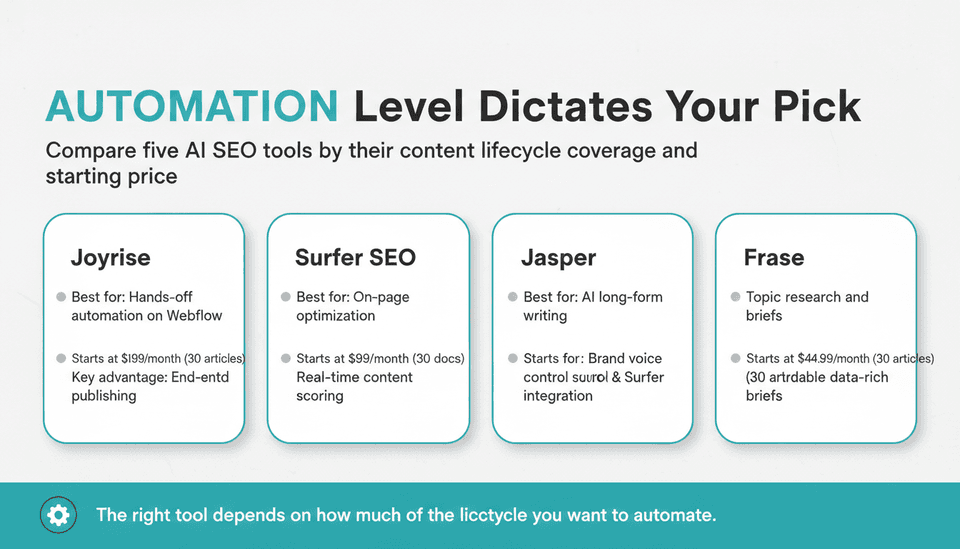
| Tool | Best for | Starting price (monthly) | Key advantage |
|---|---|---|---|
| Joyrise | Hands‑off content automation on Webflow | $199 (30 articles) | End‑to‑end: plans, writes, creates images, optimises, and publishes to Webflow |
| Surfer SEO | On‑page optimisation with AI | $99 (30 content editor docs) | Real‑time content scoring against SERP competitors |
| Jasper | AI‑generated long‑form content | $69 (unlimited words, Surfer integration) | Flexible, high‑quality first drafts with brand voice control |
| Frase | AI‑powered topic research and briefs | $44.99 (30 articles) | Affordable, data‑rich briefs that cut research time |
| Outranking | AI‑assisted content strategy and optimisation | $79 (25 documents) | Combines site analysis, content planning, writing, and optimisation |
Each tool targets a different slice of the content marketing lifecycle. The “right” pick depends on how much of that lifecycle you want to automate.
Why Small Businesses Need AI-Powered Content Automation
For a small business, every hour spent stitching together keyword tools, AI writers, image creators, and manual CMS uploads is an hour not spent on product, sales, or customer support. Content automation for small businesses isn’t a luxury—it’s the difference between publishing two articles a month and publishing two per day without growing your headcount.
The economics are even sharper for startups. Many affordable SEO tools for startups now exist, but the real savings come when one platform handles the entire chain. According to Storyteq, what is content marketing automation? It’s the practice of using software to handle repetitive content tasks—planning, creation, optimization, and distribution—so your team can focus on strategy. For a solo founder, that means turning a 4‑hour article assembly process into a review‑and‑approve step.
When you pair automation with a strong SEO content strategy for small business use, you stop guessing which topics to cover and let AI surface the gaps. The tools below aren’t just writers; they’re strategy engines, editors, and publishers. As you evaluate them, keep this question front of mind: “Which parts of my content process am I willing to own, and which parts should a tool own for me?”
How We Chose the Tools on This List
The 30+ Tools We Started With
We reviewed over 30 AI SEO platforms, including established names like MarketMuse, Clearscope, NeuronWriter, Koala, SEO.ai, and widely used AI writers such as Copy.ai and Writesonic. The starting set was built from G2’s Fall 2026 Grid Report categories for SEO and AI content, vendor directories, and tools repeatedly cited in practitioner roundups—including Zapier’s The 11 Best SEO Tools in 2026 and Whatagraph’s We Tested the 15 Best (& Underrated) AI SEO Tools in 2026. Both highlight the gap between AI writing alone and true full‑cycle SEO automation.
Our Evaluation Criteria
We filtered the list using a specific lens: can the tool automate the full content marketing lifecycle for a small business—from topic planning and research through writing, image creation, on‑page optimisation, and publishing, all the way to monitoring? Because many small businesses run on Webflow, direct Webflow publishing became a critical differentiator. We also factored in:
- Workflow automation depth – Does the tool just assist with parts, or can it run autonomously?
- Publishing integration – Does it connect directly to the CMS, or do you copy‑paste?
- Image and visual treatment – Are branded header images or infographics included, or do you source them elsewhere?
- Price transparency and cost predictability – No enterprise “call us” tiers; clear per‑article economics.
- Evidence of user adoption – Public case studies, marketplace ratings, and community mentions.
Beyond AI Writing: The Full Content Lifecycle
A common mistake is equating “AI SEO tool” with “best AI writing software for SEO.” While AI writing is critical, a tool that only generates text leaves the research, briefs, optimization, images, and publishing steps on your plate. That’s why we excluded standalone writing apps—even excellent ones. For a small business, the best AI writing software for SEO is actually one piece of a larger automated content marketing engine. Our chosen tools either supply that engine outright or pair cleanly with complementary layers.
Why We Left Out Popular Tools Like Copy.ai and Writesonic
Those tools are excellent AI content generation tools—fast at turning a prompt into a draft. But they lack deep SEO features. They don’t do automated topic research, don’t score content against competitors, and don’t publish directly to Webflow or any other CMS. For a small business that needs to produce an entire optimised, illustrated article and have it go live without manual labour, a standalone AI writer leaves too many steps undone. They serve a different need: writing assistance, not automated content marketing.
The 5 Best AI SEO Tools for Small Businesses
Joyrise – Best for Hands‑Off Content Automation on Webflow
Joyrise is the only platform in this set built specifically for Webflow users who want to outsource their entire blog operation. It scans your site to learn your brand voice, builds a keyword plan based on your content gaps and competitors, then generates long‑form articles with original branded header images and infographics. A second AI model (Quality Judge) reviews and rewrites drafts on Pro and Max tiers. Articles are published directly to your Webflow blog on a schedule you set, with no manual intervention.
Pricing: The Basic plan at $199/month includes 30 articles (up to 2 per day). That’s $6.63 per fully published, illustrated article when you use the full allocation. Pro ($499/month) steps up to 80 articles and adds news‑driven articles and a custom voice. All plans include AI images, on‑page SEO (headings, meta, internal links, table of contents), a Search Console dashboard, and a “read your first article before you pay” trial.
What sets it apart: The automation is complete. You don’t need a separate research tool, writer, image generator, or publishing workflow. The platform also uses one frontier model fine‑tuned for SEO performance—not a generic LLM. For a small business on Webflow, this is the closest thing to hiring a content team at a fraction of the price. Among Webflow SEO tools, Joyrise is the only one that treats publishing as a first‑class feature, not an afterthought. If you want SEO tools with automated publishing that handle everything after you connect your site, this is it.
Limitations: It’s Webflow‑only. If you’re on WordPress or Shopify, Joyrise isn’t an option. Also, full automation means less per‑article creative control; if you want to heavily customise each piece, you’ll need to use the draft mode and edit before publishing.
Surfer SEO – Best for On‑Page Optimization with AI
Surfer SEO doesn’t write articles. It gives you a data‑backed optimisation framework. You start with a keyword, and Surfer analyses the top‑ranking pages to tell you which terms to include, how long the content should be, and what structure wins. Its Content Editor updates a real‑time score as you write (or an AI writer feeds it text). That alone can take a draft from generic to competitive.
Pricing starts at $99/month for the Essential plan, which covers 30 Content Editor documents and an AI outline generator. To actually produce the draft, you need a separate AI writing tool—typically Jasper, which integrates with Surfer on its $69/month Pro plan.
For small businesses with an SEO‑savvy operator, the Surfer + Jasper combination is powerful. But it’s two tools, two invoices, and no built‑in publishing or image creation. You’ll spend extra time on layout, CMS uploads, and visual assets.
Jasper – Best for AI‑Generated Long‑Form Content
Jasper’s strength is generating readable, on‑brand blog posts from a simple brief. Its Pro plan ($69/month) brings the Surfer integration directly into the editor, so while you write or generate text, you can see your on‑page score and adjust. Jasper also remembers your brand voice across documents—helpful for consistency when you’re producing at scale.
However, Jasper doesn’t research keywords, create outlines based on SERP data, or publish content. It’s a writing engine. As a best AI writing software for SEO, it excels at draft quality and brand control, but you’ll still need a keyword tool (or Frase/Outranking) and a manual step to get the article onto your Webflow site. For the founder who enjoys writing but wants AI speed, Jasper is a strong pick; just budget for the time spent on everything else.
Frase – Best for AI‑Powered Topic Research & Briefs
Frase shines at cutting research time. Give it a topic, and it builds a content brief that shows the questions people ask, headings competitors use, and the average word count that ranks. Its built‑in AI writer can then generate a draft structured around that brief. At $44.99/month for 30 articles, Frase is one of the most affordable SEO tools for startups that still delivers data‑rich briefs. It’s ideal for founders who want to stay hands‑on with editing and publishing but need to move faster.
The limitation: Frase doesn’t create images, doesn’t automate publishing, and doesn’t monitor performance post‑publication. You’ll handle those parts manually. But if you’re already producing content and just need faster, data‑driven briefs and a solid first draft, Frase fits well.
Outranking – Best for AI‑Assisted Content Strategy & Optimization
Outranking connects strategy and execution more tightly than most. It can audit your site, identify content gaps, generate a prioritised plan, and then build detailed briefs. Its AI writing module produces content optimised against real‑time SERP data, and it supports direct publishing to WordPress. The Pro plan at $79/month includes 25 documents per month.
For Webflow users, the lack of direct publishing is a friction point—you’ll export or copy content. Outranking also doesn’t generate images, so you’ll need a separate tool. Still, for a small business on WordPress, or one with a dedicated content manager, Outranking provides a strong, strategy‑led workflow that reduces the guesswork. It’s one of the more complete SEO tools with automated publishing if you’re outside the Webflow ecosystem.
Honorable Mentions: Tools That Almost Made It
- MarketMuse – Deep topic modelling and content inventory scoring, but pricing starts at $149/month with limited AI writing credits and no publishing automation.
- NeuronWriter – Affordable on‑page optimisation with NLP suggestions, but its AI writer is basic and it lacks image generation or direct CMS integration.
- Koala – Good for quick AI drafts and outline generation, but no dedicated SEO optimisation layer or publishing features.
- SEO.ai – Promising full‑cycle automation, but still evolving; its Webflow integration is not yet mature, and pricing is less transparent.
Integrating AI SEO with Webflow: Tools and Automated Publishing
For small businesses running on Webflow, the choice of AI SEO tool heavily depends on how much of the final publishing step you want to automate. Most AI tools produce a text document or an HTML export; you then copy, paste, adjust formatting, upload images, set meta fields, and manually publish. True Webflow SEO tools eliminate that gap. They use Webflow’s CMS API to push live articles—complete with images, internal links, and SEO meta fields—from a single interface.
Joyrise is the only tool on this list that offers this end‑to‑end Webflow automation out of the box. Outranking automates WordPress publishing, but for Webflow users, the publishing step remains manual. This isn’t a minor inconvenience: when you’re scaling to 20+ articles a month, the minutes spent on manual publishing add up to hours. If you’re evaluating SEO tools with automated publishing, prioritize those that match your CMS. The productivity gain is immediate—you go from logging into your CMS every time to receiving a notification that a new article is live.
Building an SEO Content Strategy for Small Businesses with AI Tools
An SEO content strategy for small business doesn’t need to be complex. It needs to be consistent. AI tools can now handle three of the four pillars of a modern content strategy:
- Topic discovery & clustering – Frase, Outranking, and Joyrise analyze your site and competitors to find high‑opportunity keywords and group them into clusters. This replaces the manual process of sifting through keyword spreadsheets and guessing which terms to tackle next.
- Content production – Jasper and the built‑in writers in Frase/Outranking generate full drafts; Joyrise adds original AI images and infographics, removing the need for design tools.
- On‑page optimization – Surfer’s scoring or the integrated optimization in Joyrise and Outranking ensure every article checks the boxes that matter to search engines.
- Publishing & monitoring – The final mile is where true automation shines. Tools that publish directly and feed data back into your planning dashboards close the loop.
For a small business owner, the strategy is then to review the plan the tool generates, approve or adjust it, and let the system run. This isn’t “set and forget”—you should spot‑check performance and align with business goals—but it compresses a 20‑hour weekly process into a 2‑hour oversight role.
The Real Cost of AI SEO: Price Per Article Breakdown
 What you pay per article depends on how many tools you piece together. Below is a realistic comparison, assuming you want a final, optimised, illustrated article live on your blog—not just a text draft in a Google Doc.
| Tool or stack | Monthly cost | Articles produced | Cost per article (service) | Additional costs to complete article | Realistic cost per publish‑ready article* |
|---|---|---|---|---|---|
| Joyrise Basic | $199 | 30 | $6.63 | None | $6.63 |
| Frase Basic + manual publishing | $44.99 | 30 | $1.50 | Image creation (e.g., Canva, $0–$13/month), publishing time (≈15 min/article) | $1.50–$2.00 + time |
| Outranking Pro + manual publishing (Webflow) | $79 | 25 | $3.16 | Image creation, publishing time | $3.16 + time |
| Jasper Pro + Surfer Essential | $168 ($69+$99) | 30 (limited by Surfer docs) | $5.60 | Image creation, publishing time | $5.60 + time |
| Surfer Essential only (no writer) | $99 | 30 outlines/optimisations | $3.30 | Need writing tool (Jasper, human) | Varies widely |
*Time is valued at the user’s hourly rate; not included in monetary figures. Image tool costs assumed minimal or free tier. Real‑world time to publish, source images, and polish meta data can be 20–30 minutes per article when done manually. At a $50/hour founder rate, that’s an extra $16–$25 per article hidden in the process.
The table shows a clear trade‑off: the more automation you buy, the higher the per‑article sticker price, but the fewer unpaid hours you spend. Joyrise’s $6.63 per article is the highest tool cost but the only one where the number is final—no extra tools, no time. For startups that need affordable SEO tools for startups but also value founder time, the all‑in‑one route often becomes the cheaper option when you account for opportunity cost.
Why Piecemeal Tools Cost You More Than Money
When you chain three or four tools together—keyword research here, writing there, Surfer for optimisation, Canva for images, manual upload to Webflow—each handoff steals your attention. For a founder, that’s a distraction from product, sales, and support. And it introduces coordination risk: one tool’s update changes something, and your process breaks. As Entrepreneur magazine reported in July 2026, AI is helping small business owners spend less time on complexity and more time growing their business. A seamless automated content marketing pipeline does exactly that; a stack of disconnected tools often does the opposite.
The G2 Learn Hub’s November 3, 2026 guide on automating keyword research makes this tangible: even automating just the research phase requires a deliberate six‑step process across discovery, clustering, and prioritisation—and that’s before you touch writing or publishing. When a tool condenses all of that into a single workflow, you reclaim hours every week. Content automation for small businesses isn’t just about speed; it’s about letting the founder stay in their zone of genius while the content engine hums in the background.
How to Choose the Right AI SEO Tool: A Buyer’s Checklist
Use this framework to map your needs to the level of automation you actually want.
Level 1 – I need help with research and planning.
You’re already comfortable writing and publishing. You just want faster, smarter briefs. Pick Frase or Outranking’s research features.
Level 2 – I want AI to write drafts, but I’ll handle the rest.
You need content at scale but will edit, optimise, and publish yourself. Pair Jasper with Surfer, or use Outranking’s full suite. Budget: $150–$200/month combined.
Level 3 – I want publishing fully automated.
You’re on Webflow and want articles to appear on your blog without touching a keyboard. Go with Joyrise. Its price is fixed, and the output is publish‑ready. If you’re on WordPress, Outranking’s direct publish gets you most of the way, but you still manage images.
Ask yourself:
- Am I on Webflow? (Yes → Joyrise is the only end‑to‑end option.)
- Do I want to write or heavily edit every article? (Yes → Jasper or Frase; No → Joyrise or Outranking.)
- Can I afford to spend 1–2 hours per article on assembly? (No → choose a higher automation tier.)
- Is my monthly article cadence over 20? (Piecemeal tools become harder to scale without hiring.)
The right AI SEO platform is the one that closes the largest gap in your specific content production line. For many small businesses, that gap isn’t the writing—it’s everything after the writing.
Best AI Writing Software for SEO: A Quick Guide
When people search for the best AI writing software for SEO, they often mean a tool that does more than write—but it’s useful to separate the two. True best AI writing software for SEO (like Jasper) produces first drafts that read like a human wrote them, and it can incorporate SEO guidelines when paired with an optimizer. However, if you only buy writing software, you’ll still need to bring your own keyword list, create your own briefs, and handle the rest.
For small businesses, the smarter starting point is to look at the whole chain. If you already have a solid keyword research process and just need to speed up drafting, then Jasper or even Copy.ai is a great addition. But if you’re starting from scratch, a tool that bundles writing with research, optimization, and publishing will save you far more than the cost difference. The best AI writing software for SEO in isolation is a component; in an integrated platform, it’s the engine.
Frequently Asked Questions
What is the best AI SEO tool for a small business with no SEO experience?
Joyrise. It’s the only tool that doesn’t require you to know keyword research, on‑page structure, or image sourcing. You connect your Webflow site, and it handles the entire content lifecycle—planning, writing, images, optimisation, and publishing. If you’re not on Webflow, Outranking with manual publishing and pre‑built optimisation templates is the next most beginner‑friendly route.
How much should a small business spend on SEO tools?
A realistic budget for a single all‑in‑one AI SEO tool starts around $150–$200/month for 20–30 articles with publishing automation. If you’re building a stack of specialised tools (research + writing + optimisation + publishing), expect $150–$250/month, plus more of your time. According to Zapier’s 2026 roundup, many small businesses overspend by buying features they never use; focus on the capabilities that remove actual bottlenecks.
Can AI SEO tools replace hiring an SEO consultant?
For content production at scale, yes—an AI tool like Joyrise or a Surfer+Jasper combo can replace the bulk of content creation that an agency would handle. For strategy (topic selection, technical audits, link acquisition) and high‑level guidance, no tool replaces a seasoned SEO consultant. The best setup for many small businesses is an automated content engine plus quarterly consultant check‑ins. As the AI SEO services launch from Myna Marketing on November 5, 2026 shows, even agencies are now packaging AI execution with human strategy—treat the two as complementary.
How long does it take to see results from AI SEO tools?
With consistent publishing (2–5 articles per week), organic traffic typically starts to move within 3–6 months. If you’re publishing daily, you might see traction in 2–3 months. The timeline depends on domain authority, competition, and content quality, not the tool itself. Use the tool’s Search Console dashboard or GA4 to track impressions and clicks; that feedback loop lets you refine topic selection.
Do I need multiple SEO tools, or can one tool handle everything?
If you’re on Webflow and want true end‑to‑end automation, Joyrise handles everything—research, writing, images, SEO, publishing, and monitoring. On other platforms, you’ll likely need at least two tools: one for research/briefs and one for writing/optimisation, plus manual publishing. Piecemeal stacks are viable if you have an SEO lead, but for a solo operator, they add overhead.
Is free SEO good enough for a small business?
Free SEO tools—Google Search Console, Google Trends, and free tiers of Ubersuggest or Ahrefs Webmaster Tools—are enough to get started and fix basic technical issues. But they won’t write, optimise, or publish content for you. When you’re ready to scale content production, the jump to a paid automated content marketing platform is where you trade tool cost for time saved. For a deeper look at what free tools can and can’t do, read our guide on Free AI Tools for SEO Optimization: The Strategic Assembly Guide.
How do content automation tools help with an SEO content strategy?
Content automation for small businesses lets you execute a documented SEO content strategy for small business by removing the manual bottlenecks. The tool can track your keyword clusters, schedule articles, maintain internal linking patterns, and publish consistently—all while giving you a dashboard to monitor what’s working. Strategy becomes about deciding what to say and to whom; the tool handles the how.
Are there affordable AI SEO tools that still offer publishing automation?
Yes, but with qualifications. Joyrise’s Basic tier at $199/month is the most affordable SEO tools with automated publishing for Webflow. For WordPress, Outranking’s Pro plan at $79/month includes direct publishing, though you’ll still need an image tool. Truly affordable options usually require manual publishing or lighter automation, so weigh the cost against the hours you’ll spend on manual steps.
Key Takeaways
- The best AI SEO tools for small businesses are judged not by writing quality alone but by how much of the content lifecycle they automate—planning through publishing.
- Joyrise is the only option that publishes illustrated, SEO‑optimised articles directly to Webflow, making it the top pick for hands‑off automation.
- When you piece together tools, the true cost per article includes your time; at $6.63 per publish‑ready article, Joyrise’s fixed price often undercuts a manual stack when founder hours are factored in.
- No AI tool replaces a consultant for strategy and technical SEO—combine automated content production with occasional expert oversight for the best results.
- Start by deciding how much of the workflow you want to automate; use the three‑level framework in the buyer’s checklist to avoid paying for features you won’t use.
See how Joyrise can plan, write, and publish daily articles to your Webflow blog with zero manual work—sign up and read your first article for free.