 Joyrise
How to do GEO: A Practical 2026 Guide
 By Alexi · · Updated · 12 min read

On this page
- What is Generative Engine Optimization (GEO)?
- What you’ll achieve with GEO
- Prerequisites: What you need before starting
- How do generative engines work?
- Is SEO still relevant for generative AI search?
- Step 2: Master entity optimization for SEO
- Step 3: Implement technical SEO for AI
- How do I scale GEO without hiring an agency?
- What metrics should I track for GEO?
- Complete worked example: Scaling GEO for a Webflow SaaS blog
- How to appear in AI overviews
- Success criteria and when to roll back
- Troubleshooting GEO pitfalls
- Key Takeaways
Generative engine optimization (GEO) is no longer a nice-to-have — it’s the primary way your content gets surfaced in AI-generated search results. This guide shows how to do GEO in 2026 without paying agency retainers, by combining proven entity-optimization tactics with automated AI publishing on Webflow — your complete GEO strategy 2026. You’ll walk away with a repeatable workflow, a concrete checklist, and a clear view of when to automate vs. hire.
What is Generative Engine Optimization (GEO)?
Generative engine optimization is the practice of improving your content’s visibility in AI-generated search results — think Google’s AI Overviews, ChatGPT with browsing, Perplexity, and Bing’s Copilot answers. Unlike traditional SEO that primarily targets blue links, GEO aims to get your pages cited as sources when a generative model synthesizes a response. As the Semrush guide explains, it sits at the intersection of entity clarity, technical precision, and authoritativeness — all signals that retrievers and large language models use to decide which sources to surface. The goal is simple: when someone asks a question, your content becomes the footnote.
What you’ll achieve with GEO
Outcome, time, and risk
You can go from zero AI overview impressions to a steady, measurable stream in 60–90 days. With a dedicated approach, expect:
- Pages cited in Google AI Overviews and ChatGPT Search results for your target queries
- A new, incremental traffic source without extra ad spend
- Entity reinforcement that also lifts traditional organic rankings
The initial setup takes about two weeks for a standard Webflow site; ongoing content production runs on autopilot once configured. Risk is near zero — the technical changes are standard SEO work, and automated content is always reviewable before it goes live.
Who this guide is for
This is for founders, marketing leads, and finance operators at businesses that already have a Webflow presence and need to scale organic visibility without adding headcount or agency fees. If you’re comfortable with Webflow’s CMS, Search Console, and the idea of letting AI handle content publishing, you’ll move fast — that’s GEO for Webflow at its core.
Prerequisites: What you need before starting
Access and permissions
- Admin access to your Webflow project (to edit CMS collections, publish pages, and add custom code)
- Owner or full-user role in Google Search Console for the domain
- (Optional but recommended) Access to your domain’s DNS for snippet verification
GEO tools you’ll use
- Joyrise (Pro tier, $499/month) — automated GEO content platform that plans, writes, and publishes articles directly to Webflow, with a second AI quality judge
- Google’s Rich Results Test and Schema Markup Validator — for schema debugging
- Google NLP API or Wikidata — for entity research (optional; Joyrise handles this automatically)
- Webflow’s custom code field — to deploy JSON-LD structured data
- A working Google Search Console dashboard — you’ll track AI overview impressions here
If you prefer a manual route, you’ll need additional tools: an AI writer, a schema generator, and a content calendar. But for scale, the automated approach pays for itself within one month, as we’ll see.
How do generative engines work?
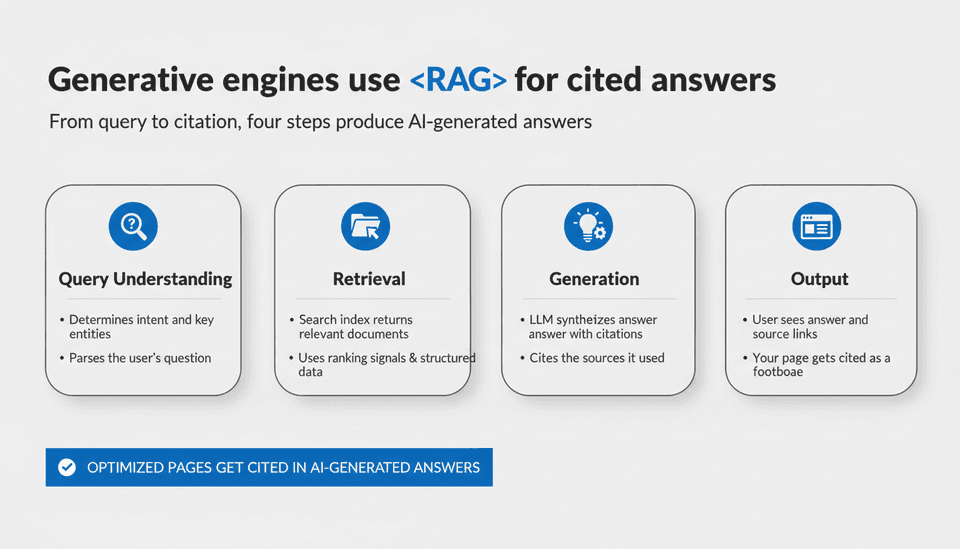
The retrieval-augmented generation pipeline
Almost all commercial generative search engines use a retrieval-augmented generation (RAG) pipeline. The process:
- Query understanding — the engine determines the intent and key entities in the user’s question.
- Retrieval — a search index (often the same one used for traditional search) returns a set of relevant documents. This stage relies heavily on ranking signals like page authority, content relevance, and structured data.
- Generation — a large language model reads the retrieved documents, synthesizes an answer, and cites the sources it used.
- Output — the user sees the answer and links to the cited pages.
Because retrieval uses the same underlying systems as traditional search, pages that rank well organically have a head start. But citation selection isn’t purely about rank; models look for entities, conciseness, and authoritative structural cues — which is why entity optimization matters more here than in classic SEO.
Why traditional SEO still matters
Speed, crawlability, mobile-friendliness, and clean HTML remain table stakes. If your page isn’t indexed or can’t be crawled efficiently, it won’t appear in the retrieval stage. The Wikipedia article on GEO underscores that GEO extends — not replaces — standard SEO practices. You can’t optimize for AI answers if your foundation is broken.
Is SEO still relevant for generative AI search?
Absolutely. Generative engine optimization (AI search optimization) is built on traditional SEO. All the work you’ve done around technical hygiene, backlinks, E-E-A-T, and site architecture feeds directly into the retrieval layer. The difference now is that you must also speak the language of entities and citations, not just keywords. If you’ve been following modern SEO best practices — fast pages, clear information architecture, regular publishing — you’re already 70% of the way there. (Is SEO Dead or Evolving in 2026? breaks down this evolution in more detail.)
Step 2: Master entity optimization for SEO
Identify your brand’s core entities
An entity is a specific, unambiguous thing: a person, product, company, concept, or location. Google’s Knowledge Graph already maintains a vast entity database; your job is to align your site’s content with those recognized entities and build your own where none exist.
- List every entity you want to be known for: your brand name, product categories, proprietary methods, key executives, and industry topics.
- Search each entity on Google; if a Knowledge Panel appears, note the associated Wikidata QID.
- Use the Google NLP API (or a tool like best free SEO tools) to extract entities from your site’s existing pages and identify gaps.
- Write down the canonical name for each entity and stick to it consistently across all content.
Structure content for entity understanding
Generative models parse headings, lists, tables, and semantic HTML to map topics. For every article:
- Use
<h1>for the primary topic entity, and<h2>/<h3>for subtopics that relate to it. - Include a concise summary paragraph immediately after the H1 that defines the entity in plain language.
- Link to authoritative sources (Wikipedia, official documentation, research papers) to signal entity trust.
- Wrap all entity mentions in consistent, descriptive anchor text when linking internally.
For deeper background on how entity thinking intersects with answer engine optimization, see Types of SEO: AEO, GEO, and Traditional Search Explained.
Step 3: Implement technical SEO for AI
Schema markup that generative engines read — structured data for AI
Generative models don’t just parse your text; they consume structured data for AI to interpret relationships. On Webflow, add JSON-LD markup via the page’s custom code field or a global site-wide snippet. Prioritize these schemas:
| Schema Type | What It Signals | Priority |
|---|---|---|
| Organization | Your brand’s legal name, logo, sameAs links | High |
| Article (with author) | Content type, publish date, author entity | High |
| FAQPage | Question-answer pairs that can be pulled directly into AI overviews | Medium |
| HowTo | Step-by-step procedures ideal for task completion queries | Medium |
| Product | Product attributes for e-commerce citations | Medium |
After adding schema, run every page through Google’s Rich Results Test and fix errors before publishing.
Internal linking for topic clusters
AI retrieval models assess a site’s topical authority by looking at internal link patterns. Build a pillar-cluster structure:
- Create a pillar page for each core entity (e.g., “Generative Engine Optimization”).
- Publish 8–15 supporting articles on sub-aspects of that entity, each linking back to the pillar and to each other.
- In Webflow, use the CMS’s multi-reference field or manual rich-text links to maintain context.
This signals to retrievers that your site offers depth on the topic — exactly what generative models prefer.
GEO Tactics Checklist Use this quick reference as you implement each step.
| Action | Done? |
|---|---|
| Organization schema deployed site-wide | ☐ |
| Article schema on every blog post with author entity | ☐ |
| FAQ schema for pages with Q&A content | ☐ |
| Entity list for brand, products, and core topics documented | ☐ |
| All entities used consistently in headings and body text | ☐ |
| Pillar page created for each entity cluster | ☐ |
| Internal links from supporting articles to pillar pages exist | ☐ |
| Page speed under 2.5s LCP on mobile | ☐ |
How do I scale GEO without hiring an agency?
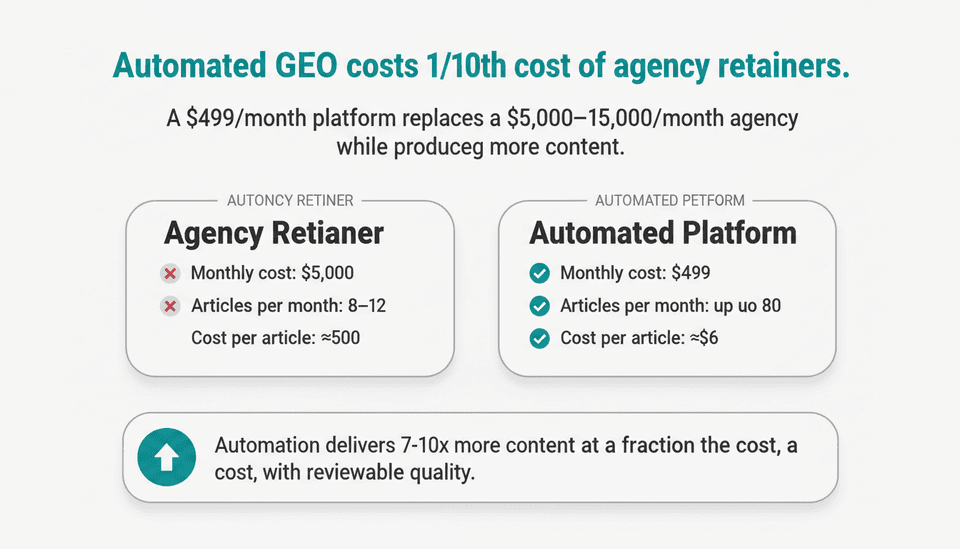 Agencies have noticed the GEO opportunity. As recently as October 30, 2026, ALM Corp reported that agencies now offer white-label GEO services, combining AI visibility audits, entity optimization, and digital PR — easily running $5,000–$15,000 per month for a typical B2B SaaS company. That works if you have a dedicated budget, but for most operators, it’s an overhead line that doesn’t close.
When to automate GEO: the cost/benefit of agencies vs. AI
If you need more than 20 articles per month to cover your entity clusters, an agency retainer is hard to justify. The math:
- Agency: $5,000/month for 8–12 GEO-optimized articles, plus strategy.
- Automated platform (Joyrise Pro): $499/month for 80 articles, published directly to your Webflow blog, with built-in schema, entity optimization, and a second AI quality pass.
That’s roughly 1/10th the cost for 7–10x the volume. What you trade off is the human strategic review — but if your entity map is solid and you monitor Search Console regularly, the automated output stays on-brand.
How Joyrise handles GEO at scale
Joyrise does three things that would otherwise require manual hours:
- Site scan and entity mapping — It crawls your Webflow site, extracts your voice, and identifies entity gaps using its internal model.
- Daily publishing with built-in SEO — Articles go live with schema, internal links, optimized headings, and original images. The Pro tier uses a second AI to rewrite drafts for quality, hitting a bar that rarely needs manual edits.
- Integrated Search Console tracking — AI overview impressions are surfaced inside the platform, so you see exactly which topics are gaining citation traction.
For a Webflow blog, you set it up once: connect your site, approve the topic plan, and review drafts if you choose. The system handles the rest. That’s how a SaaS team of five can sustain a GEO content engine that would normally require a full-time editor and an agency.
What metrics should I track for GEO?
Search Console AI visibility reports
In Google Search Console, go to Performance > Search results, then add a filter: Search Appearance > AI Overviews. This shows impressions, clicks, and average position for queries where your page appeared in an AI Overview. Track:
- Impressions — are they growing month-over-month?
- Clicks — are people clicking through from the overview, or just seeing your snippet?
- CTR — a low CTR may indicate the AI summary satisfied the query without a click; that’s fine for brand visibility.
Also monitor queries that trigger AI Overviews and compare them with your current keyword targeting. New queries that surface here signal entity associations you weren’t explicitly targeting.
Tracking entity mentions and PR
Beyond Search Console, use a brand monitoring tool (such as Google Alerts or Ahrefs’ Web mentions) to catch instances where your brand or products are mentioned in AI-generated chat outputs. These mentions are harder to track programmatically because ChatGPT Search and Perplexity don’t offer referral data in the same way, but anecdotal tracking will tell you if your entity optimization is working.
For a complete view, pair this with standard organic traffic metrics. If AI overview citations pull traffic away from traditional blue links, your overall clicks might stay flat even while GEO performance soars — so watch the mix, not just totals.
Complete worked example: Scaling GEO for a Webflow SaaS blog
The setup
A B2B SaaS company selling inventory management software had a Webflow blog with 40 manually-written posts, publishing 2 per month. Organic traffic was flat at 5,000 sessions/month, and AI overview impressions were near zero. The team wanted to appear for queries like “inventory optimization for warehouses” and “how to reduce stockouts” without hiring an SEO agency.
They signed up for Joyrise Pro ($499/month) and spent one afternoon connecting their Webflow blog.
Automating content with Joyrise
- Site scan — Joyrise ingested all existing posts, analyzed their style, and identified the primary entity: the product StockFlowPro, along with secondary entities like “safety stock,” “reorder point,” and “warehouse management.”
- Topic plan — The platform generated an entity-driven content calendar covering pillar pages and cluster articles. Example: a pillar on “Inventory Optimization” supported by articles on demand forecasting, ABC analysis, and cycle counting.
- Automated publishing — Set to publish 3 articles per day, Monday–Friday (about 65/month). Each article included:
- Article schema with author entity (“StockFlowPro Editorial Team”)
- Internal links to cluster pages
- FAQ sections with proper schema
- Original AI-generated header images
- Quality judge — The second AI pass re-wrote drafts that strayed from the brand style or were too generic. The team reviewed only 5% of articles, mostly news-driven pieces.
Results and adjustments
After eight weeks, the Search Console dashboard showed daily AI Overview impressions rising from zero to an average of 120, with clicks following proportionally. Total organic traffic increased 27%, driven partly by improved rankings for cluster terms and partly by clicks from AI overviews. The team identified that “inventory forecasting” queries were their strongest GEO performers, so they adjusted the topic plan to publish more content in that sub-cluster, further boosting visibility.
One caution: a few auto-generated pages were thin and didn’t get indexed. Those were quickly removed via the draft queue, and the system learned to avoid that pattern.
How to appear in AI overviews
Pull the threads together from every preceding step:
- Make entities unambiguous — pick a canonical name and use it everywhere.
- Answer the question immediately — put a concise definition or direct answer in the first 100 words.
- Use structured data aggressively — Article and FAQ schema are non-negotiable.
- Cite trustworthy sources — even when you’re the original authority, linking out to research or official definitions helps retrieval models assess credibility.
- Cluster internally — a well-linked cluster signals depth.
- Keep technical performance tight — if your page loads in 3+ seconds, it rarely gets cited.
These tactics form a GEO checklist that works across Google, ChatGPT, and Perplexity.
Success criteria and when to roll back
Define success by tracking two things in Search Console: “AI Overviews” impressions and total organic clicks for GEO-targeted pages. After 90 days, a healthy GEO operation shows:
- Impressions from AI Overviews growing monthly, with a portfolio of at least 15 queries triggering citations.
- No decline in non‑AI organic traffic for your target pages (cannibalization is minimal).
If automated content volume overwhelms your site and index quality drops, roll back by pausing auto-publishing. In Joyrise, switch the publishing mode to “drafts only” and audit the queue. Prune any articles that duplicate existing content or target low‑value keywords, then resume publishing at a lower daily limit. The quality‑judge AI pass can also be made stricter through custom voice settings.
Troubleshooting GEO pitfalls
No improvement in AI overviews
Likely cause: pages aren’t in the retrieval set yet. Check:
- Are your target pages indexed? (site:yourdomain.com in Google)
- Do they rank in the top 10 organically for the query? If not, focus on improving traditional rankings first; GEO citation rarely happens outside top results.
- Is schema valid and containing the right entity relationships? Revalidate.
- Have you waited at least 8 weeks? AI models don’t re‑rank daily; changes take time.
Traffic drop after implementation
A drop can happen if your automated content cannibalizes existing pages. Run a Search Console query overlap report: if two pages show for the same query, consolidate or noindex the weaker one. Also check that new articles aren’t accidentally triggering a thin‑content filter — prune any with fewer than 600 words or duplicate intros.
Content quality concerns with automation
If publish‑draft reviews show repetitive, off‑brand, or shallow articles, first ensure you’re using the second AI quality judge (Pro tier on Joyrise). Then tighten your brand voice guide — in Joyrise, the custom voice field can be adjusted to enforce strict tone rules. Finally, set aside 30 minutes per week to spot‑check 5 random articles; the platform’s revision queue makes it easy to recall and fix any that slipped through.
Key Takeaways
- GEO is not separate from SEO — it’s an extension that demands entity clarity and technical precision on top of classic ranking fundamentals.
- Automation slashes GEO costs — a $499/month platform can replace a $5,000‑$15,000 agency retainer while producing more content, provided you monitor quality.
- Entity mapping is the single highest‑impact move — websites that unambiguously peg their brand to Knowledge Graph entities get cited far more often.
- Track AI Overview impressions in Search Console month over month — that’s the only reliable metric that tells you your GEO strategy is working.
- Set a 90‑day success window — GEO changes propagate slowly; don’t pivot tactics before you’ve given the retrieval system time to absorb your new entity signals.
Ready to implement a GEO strategy that runs on autopilot? Start your free trial and read your first article today at Joyrise.